
Key facts
- Brand
- Philips
- Model
- DVP6600
- Category
- Player
- Industry
- Appliances
- Documents
- 3
- Languages
- EN · ZH
- Last added
- 2012-03-26
Start here
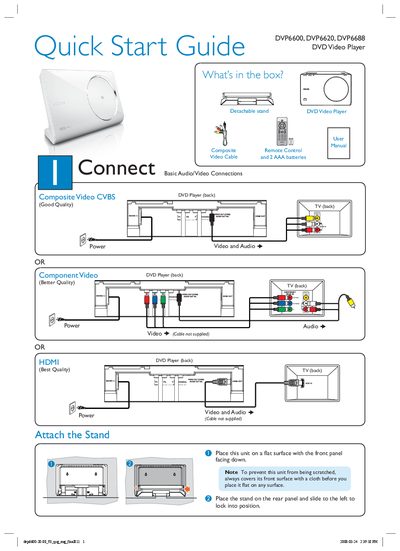
Philips DVP6600 DVP6620 DVP6688 DVD Video Player Quick Start Guide
This quick start guide explains how to set up Philips DVP6600, DVP6620 and DVP6688 DVD Video Players. It shows the basic audio/video connections, how to attach the stand, and how to select the display language and other preferences.
The guide also lists the items included in the box, provides step‑by‑step instructions for turning the unit on, selecting the TV channel, starting disc playback, and troubleshooting common issues such as no power, no picture, or remote‑control problems.
Philips DVP6600 specifications
| Laser type | Semiconductor laser InGaAlP (DVD), AIGaAs (CD) |
|---|---|
| Wave length | 658 nm (DVD), 790 nm (CD) |
| Output power | 7.0 mW (DVD), 10.0 mW (VCD/CD) |
| Beam divergence | 60 degrees |
Source: Philips DVP6600 DVP6620 DVP6688 DVD Video Player User Manual
All Philips DVP6600 documents by type
Day-to-day operation, settings and troubleshooting. Start here if the product is already set up.
The shortest path to a working setup, usually only a few pages.
Questions answered in these manuals
What should I do if the player has no power?
Make sure the AC power cord is securely connected and press the STANDBY‑ON button on the top panel to turn the unit on.
From: Philips DVP6600 DVP6620 DVP6688 DVD Video Player Quick Start Guide
How can I start disc playback?
Load a disc, then press PLAY/PAUSE to begin playback; press STOP to stop.
From: Philips DVP6600 DVP6620 DVP6688 DVD Video Player Quick Start Guide
How should discs be cleaned for the Philips DVP6600, DVP6620, DVP6688?
Wipe the disc with a microfiber cleaning cloth from the centre to the edge in a straight line movement. Do not use solvents such as benzene, thinner, commercial cleaners, or anti-static sprays intended for discs.
From: Philips DVP6600 DVP6620 DVP6688 DVD Video Player User Manual
Where should the Philips DVP6600, DVP6620, DVP6688 DVD player be placed?
Place the unit on a flat, hard, and stable surface. Do not place it on a carpet or on top of other equipment that might heat it up.
From: Philips DVP6600 DVP6620 DVP6688 DVD Video Player User Manual
What is included in the box?
The box contains the DVD player, a remote control, 2 AAA batteries, and a detachable stand.
How do I choose the on-screen display language?
Press SETUP to open the settings page, select Display Language, choose a language option, and press OK to confirm.