
This quick start guide introduces how to connect and use the DVD player, including how to connect the power cable, audio/video cables, and how to set the display language.
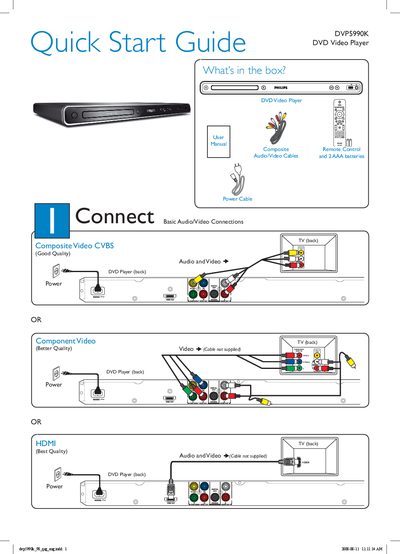
The guide lists the items included in the box—DVD player, power cable, composite remote control, audio/video cables and batteries—and shows how to connect the player to a TV using composite, component or HDMI cables. It also explains the basic power‑on procedure and how to select the correct TV viewing channel.
Setup steps cover selecting the on‑screen language, using the SETUP menu, and starting disc playback. The troubleshooting section provides quick checks for common issues such as no power, no picture, no sound, HDMI settings, and remote‑control problems.
Press the power button (marked 5) on the unit.
Use the TV remote to press the Channel Down button repeatedly until the Video In channel appears.
Check the connection to the TV and ensure the cables are firmly in place.
Make sure the batteries are loaded correctly or replace them with new ones.