
Key facts
- Brand
- Philips
- Model
- DVP3980K
- Category
- Player
- Industry
- Appliances
- Documents
- 2
- Languages
- JA · ZH
- Last added
- 2012-01-24
Start here
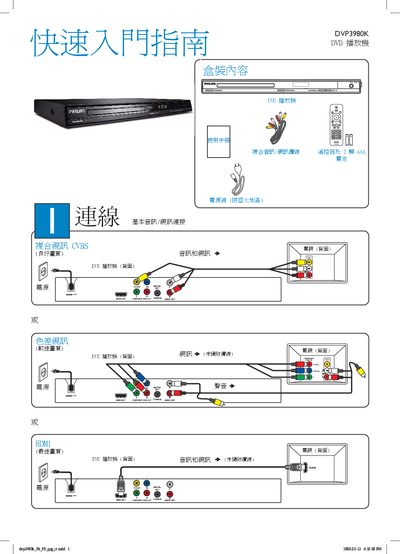
Philips DVP3980K DVD Player Quick Start Guide
The guide provides a brief overview of the box contents, required connections, and basic operation steps for the Philips DVP3980K DVD player. It includes instructions for connecting power, audio/video cables, and selecting the display language.
Key sections cover disc loading, playback controls, and troubleshooting tips for common issues such as no power, no picture, or no sound. Users are directed to the full user manual for more detailed information. This manual is written in Chinese.
Philips DVP3980K specifications
| Video Output | HDMI 1080p |
|---|---|
| Supported Video Formats | MPEG‑1, MPEG‑2, DivX Ultra |
| Power Consumption (active) | <10 W |
| Power Consumption (standby) | <1.0 W |
| Power Supply | 110‑240 V, 50/60 Hz |
| Dimensions (W×H×D) | 360 mm × 37 mm × 209 mm |
All Philips DVP3980K documents by type
Day-to-day operation, settings and troubleshooting. Start here if the product is already set up.
The shortest path to a working setup, usually only a few pages.
Questions answered in these manuals
What video formats does the DVP3980K support?
It supports MPEG‑1, MPEG‑2, and DivX Ultra video formats.
What is the power consumption of the DVP3980K?
The player consumes less than 10 W during operation and less than 1.0 W in standby mode.
What should I do if the player has no power?
Check that the AC power cable is correctly connected and press the STANDBY‑ON button on the front panel to turn the unit on.
How can I change the on‑screen language?
Press the SETUP button, select the desired language on the General Settings page, and confirm with the OK button.