
Key facts
- Brand
- Philips
- Model
- DVDR3425H
- Category
- Player
- Industry
- Appliances
- Documents
- 4
- Languages
- ZH · EN
- Last added
- 2012-03-26
Start here
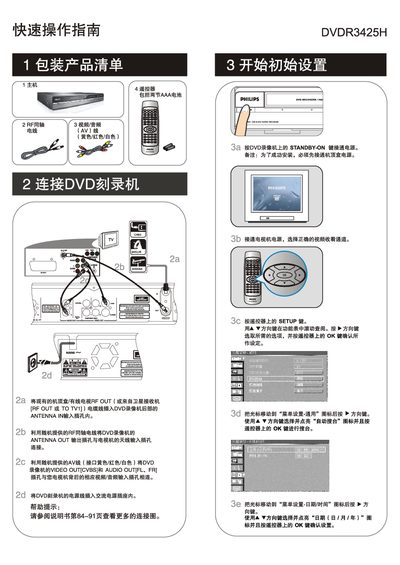
Philips DVDR3425H Quick Start Guide
This guide shows how to connect the DVDR3425H to a TV or set‑top box using the supplied RF coaxial cable or AV cables, and how to power the unit. It also explains how to select the correct input source on the TV and how to configure basic menu settings such as auto‑search and date/time.
The manual then describes how to insert a recordable DVD, choose a source, set recording quality, and start, pause, or stop a manual recording. It includes supported disc formats and typical recording times for each quality level, as well as how to play back recorded titles from DVD or the internal hard‑disk. This manual is written in Chinese.
Philips DVDR3425H specifications
| Dimensions | 430 x 57 x 340 mm |
|---|---|
| Weight | 4.4 kg |
| DVD‑R Capacity | 4.7 GB |
| Supported DVD Formats | DVD‑R, DVD‑RW, DVD‑R/+RW |
All Philips DVDR3425H documents by type
Day-to-day operation, settings and troubleshooting. Start here if the product is already set up.
The shortest path to a working setup, usually only a few pages.
Questions answered in these manuals
What DVD formats are supported by the player?
The player supports DVD‑R, DVD‑RW and DVD‑R/+RW discs.
What does the standby mode do?
Standby mode turns off the display and reduces power consumption while keeping the device ready for quick start.
What is the maximum recording time of the DVDR3425H?
The device can record up to 250 hours on its 160 GB hard‑disk.
Which video formats can be played on the DVDR3425H?
It supports DivX 3.11, DivX 4x, DivX 5x, MPEG‑1 and MPEG‑2 video formats.
What is the capacity of a DVD recordable disc?
A DVD‑R disc holds 4.7 GB, which is about one hour of recordings at the highest quality and about eight hours at the lowest quality.
How do I clean a disc?
Use a micro‑fibre cleaning cloth and wipe the disc from the centre to the edge in a straight line.