
Key facts
- Brand
- Philips
- Model
- AZ5740
- Category
- Other
- Industry
- Appliances
- Documents
- 5
- Languages
- EN · ZH
- Last added
- 2012-03-27
Start here
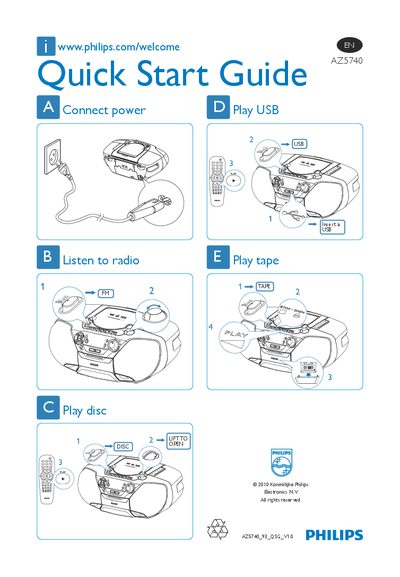
Philips AZ5740 Quick Start Guide
The Philips AZ5740 Quick Start Guide provides concise instructions for getting the device up and running. It shows how to connect power, tune radio stations, and operate the various media functions.
Key functions include playing audio from a USB device, a compact disc, or a cassette tape, as well as basic operation of the built‑in FM radio. The guide uses simple diagrams and short text to help users start using the player quickly. This manual is written in Chinese.
Philips AZ5740 specifications
| Supported Media | DVD, VCD, SVCD, MP3‑CD, CD(RW), Picture CD, USB Direct |
|---|---|
| Speaker Output Power | 2 × 1 W RMS |
| Dimensions (W × H × D) | 401 mm × 172 mm × 243 mm |
| Weight | 3.2 kg |
| Power Supply | 100‑240 V AC, 50/60 Hz |
| USB Direct Playback | MP3/WMA playback from USB device |
All Philips AZ5740 documents by type
Day-to-day operation, settings and troubleshooting. Start here if the product is already set up.
The shortest path to a working setup, usually only a few pages.
Questions answered in these manuals
How do I play music from a USB device?
Insert a USB device, select the MP3 or WMA files and use the USB Direct mode to play the music.
How can I record CD audio onto a cassette?
Use the CD‑to‑cassette synchronous recording function to start recording from a CD onto the cassette.
How do I play audio from a USB device?
Insert the USB device and select the "Play USB" option.
How do I open the disc compartment?
Lift the disc cover to open it.
Can the device be used near water?
No, the manual states that the device must not be used near water.
What should I do if the audio or subtitle language cannot be set?
If the disc is not multi‑language, the audio or subtitle language cannot be changed; this is normal and not a fault.