
This document describes the installation steps of wireless network card TL-WN727N, including hardware installation and software installation.
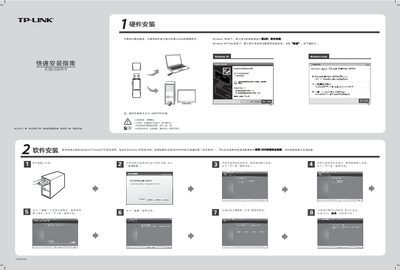
The guide provides step‑by‑step hardware installation instructions, showing how to insert the USB card into the correct slot without powering down the computer. It also includes a software installation walkthrough that works the same across Windows XP, Vista, and 7, with screenshots of the driver installer.
After the driver is installed, the document explains how to use the QSS (Quick Secure Setup) button on the card to automatically connect to a QSS‑enabled router or access point, including how to scan for networks, select an SSID, and enter a password if required. This manual is written in Chinese.
| Model | TL-WN727N |
|---|---|
| Interface | USB |
Insert the USB network card into the appropriate slot in the correct orientation; the computer does not need to be powered down.
The software will display the authentication and encryption type; simply click Continue and enter the network password when prompted.