
Key facts
- Brand
- Philips
- Model
- C702
- Category
- Cell Phones
- Industry
- Electronics
- Documents
- 3
- Languages
- EN · ZH
- Last added
- 2012-05-02
Start here
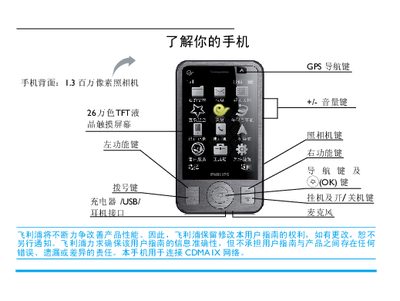
Philips C702 Phone User Manual
This manual explains how to power the Philips C702 on and off, lock or unlock the keyboard, make and receive calls, send messages, and use the built‑in camera, GPS navigation and multimedia functions. It also covers system settings such as screen calibration, shortcut keys, power‑saving mode, and accessory usage like the stylus.
Additional sections describe how to insert and register a UIM card, manage contacts and call logs, use the toolbox applications (calendar, notes, calculator, etc.), and troubleshoot common issues. Warranty information, safety guidelines, and environmental compliance details are also included. This manual is written in Chinese.
Philips C702 specifications
| Storage temperature range | -25°C to +85°C |
|---|---|
| Operating ambient temperature | -20°C to +75°C |
| Rated voltage | 180Vac to 253Vac |
| Maximum load | 400W, any type of lamp load |
| Stand‑by power consumption (Relay ON) | < 8W (peak) |
Source: Philips LLC7020 Outdoor Luminaire Controller User Manual
All Philips C702 documents by type
Day-to-day operation, settings and troubleshooting. Start here if the product is already set up.
Questions answered in these manuals
What does the green LED indicate?
The green LED is on when the OLC unit has mains power.
From: Philips LLC7020 Outdoor Luminaire Controller User Manual
How does the OLC handle communication failure with the Segment Controller?
It can fall back to photocell operation or to a back‑up scheduler, allowing the controller to operate autonomously when communication is lost.
From: Philips LLC7020 Outdoor Luminaire Controller User Manual
How do I turn the phone on or off?
Press and hold the E key to power the phone on or off.
How do I insert the UIM card?
Open the back cover, align the card with the slot (corner left‑up, contacts down) and push it in, then replace the battery.