
This document is a user guide for Philips phone, which introduces the function and usage of the phone.
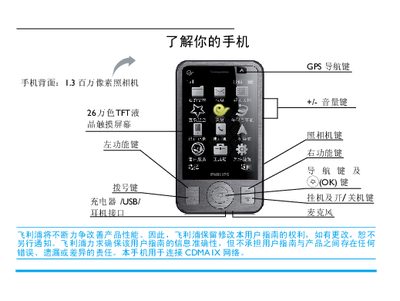
This manual explains how to power the Philips C702 on and off, lock or unlock the keyboard, make and receive calls, send messages, and use the built‑in camera, GPS navigation and multimedia functions. It also covers system settings such as screen calibration, shortcut keys, power‑saving mode, and accessory usage like the stylus.
Additional sections describe how to insert and register a UIM card, manage contacts and call logs, use the toolbox applications (calendar, notes, calculator, etc.), and troubleshoot common issues. Warranty information, safety guidelines, and environmental compliance details are also included. This manual is written in Chinese.
| Camera resolution | 1.3 megapixel |
|---|---|
| Display | 260,000‑color TFT LCD touchscreen |
| Network | CDMA1X |
| SAR (maximum) | 0.461 W/kg |
Press and hold the E key to power the phone on or off.
Open the back cover, align the card with the slot (corner left‑up, contacts down) and push it in, then replace the battery.
The C702’s maximum specific absorption rate is 0.461 W/kg.
Go to System Settings > Screen Calibration and follow the on‑screen instructions.