
Key facts
- Brand
- Philips
- Model
- AZ1226
- Category
- Player
- Industry
- Appliances
- Documents
- 2
- Languages
- ZH
- Last added
- 2012-03-27
Start here
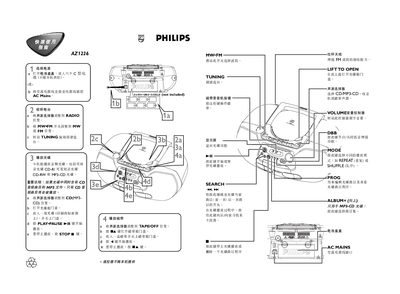
Philips AZ1226 Player Quick Start Guide
The guide explains how to power the AZ1226 using either six C‑size batteries or an AC mains connection. It describes selecting the audio source—CD/MP3, radio, or cassette—and the basic controls for volume, playback, and mode selection.
Instructions cover inserting discs, operating the tape deck, tuning FM/MW radio, and using the remote control. The manual also notes special functions such as bass boost, repeat, and shuffle modes. This manual is written in Chinese.
Philips AZ1226 specifications
| Laser Class | Class 1 |
|---|---|
| Battery Type | Six 1.5 V R‑14, UM‑2 or C‑type alkaline batteries |
| Power Input | AC mains (plug) |
| Headphone Jack | 3.5 mm stereo |
| Maximum Playlist Length | 20 tracks (CD) / 10 tracks (MP3‑CD) |
All Philips AZ1226 documents by type
Day-to-day operation, settings and troubleshooting. Start here if the product is already set up.
The shortest path to a working setup, usually only a few pages.
Questions answered in these manuals
What batteries can be used in the AZ1226?
The device uses six 1.5 V alkaline batteries: R‑14, UM‑2 or C‑type.
How many tracks can I store in a playlist?
You can store up to 20 tracks for CD playback or up to 10 tracks for MP3‑CD playback.