
Key facts
- Brand
- Philips
- Model
- PET831
- Category
- Player
- Industry
- Appliances
- Documents
- 3
- Languages
- EN · ZH
- Last added
- 2012-03-27
Start here
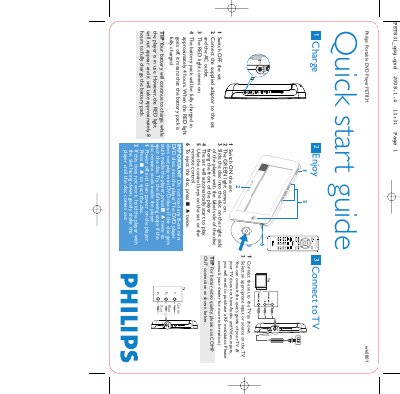
Philips PET831 Portable DVD Player Quick Start Guide
This guide provides the essential steps to get the Philips PET831 portable DVD player up and running. It explains how to charge the battery, power the unit on, insert a DVD and start playback.
It also shows how to connect the player to a television, what disc types are supported, and how to troubleshoot a stuck disc. Follow the illustrated procedures for safe and reliable operation.
Philips PET831 specifications
| Battery full charge time | approximately 4 hours |
|---|---|
| Battery charge time while in use | approximately 8 hours |
| Disc compatibility | Standard DVDs only (no 8‑cm mini DVDs) |
| Power indicator | RED light = charging, GREEN light = power on |
Source: Philips PET831 Portable DVD Player Quick Start Guide
All Philips PET831 documents by type
Day-to-day operation, settings and troubleshooting. Start here if the product is already set up.
The shortest path to a working setup, usually only a few pages.
Questions answered in these manuals
How do I know when the battery is fully charged?
When the RED light goes off, the battery pack is fully charged.
How do I reset the player if it hangs?
Press the RESET button on the player to restart it when the device becomes unresponsive.
What should I do if the player cannot read a disc?
Try cleaning the disc with a commonly available cleaning CD/DVD, and ensure the disc label is facing up before inserting it.