
Key facts
- Brand
- Agilent
- Model
- G2615A
- Industry
- Industrial
- Documents
- 4
- Languages
- EN
- Last added
- 2012-07-05
Start here
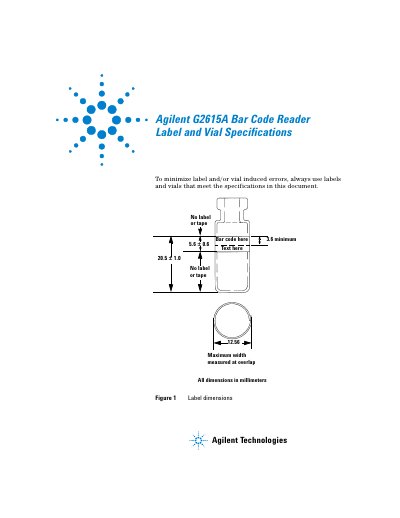
Agilent G2615A Bar Code Reader Label and Vial Specifications
This document outlines the required specifications for labels and vials intended for use with the Agilent G2615A Bar Code Reader. Adhering to these dimensions is necessary to minimize label- or vial-induced errors during scanning operations.
The text includes specific dimensional requirements, illustrated in figures showing label dimensions (Figure 1) and maximum capped vial heights (Figure 2). All measurements are provided in millimeters.
Agilent G2615A specifications
| Maximum label radius for no overlap | < 6.015 mm |
|---|---|
| Read aperture diameter | 21.5 mm |
| Minimum bar code height | 3.6 mm |
| Maximum label thickness (B) | 0.50 mm |
Source: Agilent G2615A Bar Code Reader Unsupported Label and Vial Specifications
All Agilent G2615A documents by type
Day-to-day operation, settings and troubleshooting. Start here if the product is already set up.
Questions answered in these manuals
What is the minimum width for a bar code on the label?
The bar code must have a minimum width of 3.6 millimeters.
From: Agilent G2615A Bar Code Reader Label and Vial Specifications
What are the maximum and minimum dimensions for the text area on the label?
The text area must be at least 20.5 millimeters wide and no more than 21.5 millimeters wide.
From: Agilent G2615A Bar Code Reader Label and Vial Specifications
What is the maximum radius for a label to prevent overlap?
The maximum radius for no label overlap is 6.015 mm.
From: Agilent G2615A Bar Code Reader Unsupported Label and Vial Specifications
What is the minimum bar code height required on a vial?
A minimum bar code height of 3.6 mm is required.
From: Agilent G2615A Bar Code Reader Unsupported Label and Vial Specifications
What replaces the G1926A bar code reader?
The new G2615A bar code reader is designed to replace the G1926A model.
From: Agilent G2614A ALS Tray and G2615A Bar Code Reader Information Sheet
Does the G2614A tray require a positioning bracket adjustment?
No, the G2615A reader mounts securely to the tray and alleviates the need to adjust a positioning bracket.
From: Agilent G2614A ALS Tray and G2615A Bar Code Reader Information Sheet