
Key facts
- Brand
- Philips
- Model
- MCD900
- Industry
- Electronics
- Documents
- 2
- Languages
- ZH
- Last added
- 2012-03-27
Start here
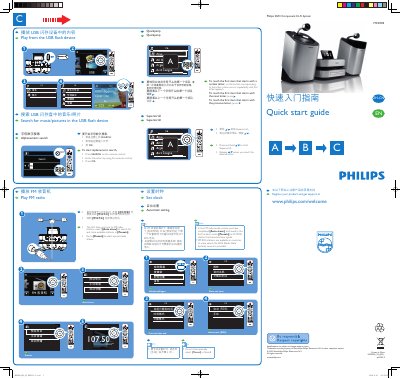
Philips MCD900 DVD Component Hi-Fi System Quick Start Guide
The guide introduces the Philips MCD900 DVD Component Hi-Fi System, its main unit, speakers, remote control, power cord and accessories. It explains how to connect the unit to a TV and speakers using the supplied audio/video cable (2‑3 m) or an optional HDMI cable.
Step‑by‑step instructions show how to play media from a USB flash device, tune FM radio, set the clock (automatically via RDS or manually), and use remote‑control functions such as disc menu, track selection, pause, stop and standby modes. This manual is written in Chinese.
Philips MCD900 specifications
| Audio/video connection cable length | 2‑3 m |
|---|---|
| Remote control batteries | 2 × AAA |
| Power indicator colour (active standby) | Red |
Source: Philips MCD900 DVD Component Hi-Fi System Quick Start Guide
All Philips MCD900 documents by type
Day-to-day operation, settings and troubleshooting. Start here if the product is already set up.
The shortest path to a working setup, usually only a few pages.
Questions answered in these manuals
How do I play music or photos from a USB flash device?
Insert the USB flash device and select the USB playback option; the unit will display and play the stored music or pictures.
From: Philips MCD900 DVD Component Hi-Fi System Quick Start Guide
How can I set the clock manually?
Press the Manual button in step 4 of the clock‑setting menu to enter the time yourself.
From: Philips MCD900 DVD Component Hi-Fi System Quick Start Guide
How can I register my Philips MCD900 for support?
You can register the product at www.philips.com/welcome to obtain support.
What disc formats does the MCD900 play?
The MCD900 supports DVD, VCD, SVCD, DVD+RW, DVD‑RW, DVD+R, DVD‑R, CD, DivX (Ultra) and MP3/WMA discs.