
TP-Link TL-PA101 Powerline Adapter Quick Installation Guide, introduces the product's hardware connection, indicator light instructions, interface instructions, and FAQs
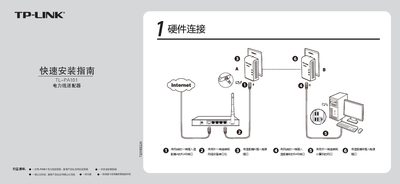
This guide shows how to connect the TL-PA101 adapters: plug each adapter into a wall outlet, connect one end of an Ethernet cable to the RJ45 port of Adapter A and the other end to your network device, then connect the second Ethernet cable from Adapter B to your computer. The kit includes two adapters, a CD, two Ethernet cables, a warranty card and a quick‑start guide.
The document explains the meaning of the indicator LEDs (system status, network connection, data transmission) and provides answers to common questions such as the need for a traditional modem, maximum transmission distance, interference from household appliances, and compatibility between TL-PA101 and TL-PA201 models. This manual is written in Chinese.
| Maximum transmission distance | 200 m |
|---|---|
| RJ45 port speed | 10/100 Mbps |
| Number of adapters in kit | 2 adapters |
Yes, the powerline adapter only creates a LAN inside the home; you still need a modem or router for internet access.
The TL-PA101 can transmit data up to 200 meters.
No, the two models use different protocol standards and are not interoperable.
Generally they have little impact, but power strips and chargers may interfere; place the adapter directly in a wall socket and keep it away from such devices.