
Key facts
- Brand
- Philips
- Model
- AZ5140
- Category
- MP3 Player
- Industry
- Electronics
- Documents
- 4
- Languages
- JA · ZH · EN
- Last added
- 2012-03-27
Start here
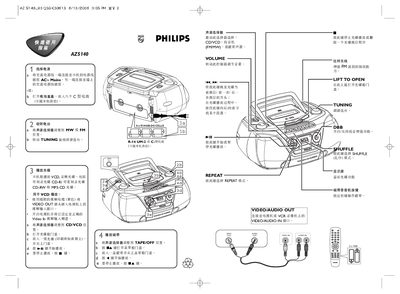
Philips AZ5140 Quick Start Guide
This guide explains how to power on the Philips AZ5140, insert a CD, CD‑R, CD‑RW, CD‑RV or MP3‑CD, and start playback. It also describes the basic controls for play, repeat, shuffle and tuning.
The document shows how to connect the VIDEO OUT or VIDEO/AUDIO IN ports to a TV or VCR, adjust volume, and use the shuffle (乱序) and repeat modes for varied listening experiences. This manual is written in Japanese.
Philips AZ5140 specifications
| Supported disc formats | CD‑R, CD‑RW, CD‑RV, MP3‑CD |
|---|---|
| Video output connector | VIDEO OUT |
| Shuffle mode | Enabled via SHUFFLE button (乱序) |
Source: Philips AZ5140 Quick Start Guide
All Philips AZ5140 documents by type
Day-to-day operation, settings and troubleshooting. Start here if the product is already set up.
The shortest path to a working setup, usually only a few pages.
Questions answered in these manuals
How do I enable shuffle playback?
Press the SHUFFLE button to activate shuffle (乱序) mode.
How can I connect the player to a TV?
Use the VIDEO OUT connector on the player and connect it to the TV’s video input.
How do I program MP3‑CD tracks?
In stop mode, press the PROG key on the remote to enter programming mode, select a track with the number keys or ∞/§ keys, then press PROG again to save it.
How can I switch the TV format between PAL and NTSC?
Press the NTSC/PAL key on the remote to toggle between NTSC and PAL video standards.
What should I do if the display shows "NO DISC"?
Insert a disc, check that it is not upside‑down, wait for any moisture on the lens to evaporate, and clean or replace the disc if needed.
From: PhilipsPHILIPSAZ5140 MP3 VCD CD Card Band radio Machine Record Machine table Type Recording Machine
How long can the AZ5140 run on alkaline batteries?
Approximately 9 hours of playback on alkaline batteries.
From: PhilipsPHILIPSAZ5140 MP3 VCD CD Card Band radio Machine Record Machine table Type Recording Machine