
This quick start guide introduces how to use AZ5140 multi-function speaker. This speaker can play VCD, audio CD, recordable CD-R/rewritable CD-RW and MP3-CD discs, and also listen to FM/MW radio.
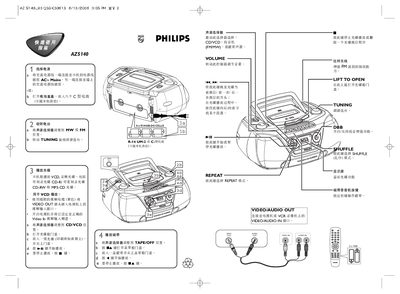
This guide explains how to power on the Philips AZ5140, insert a CD, CD‑R, CD‑RW, CD‑RV or MP3‑CD, and start playback. It also describes the basic controls for play, repeat, shuffle and tuning.
The document shows how to connect the VIDEO OUT or VIDEO/AUDIO IN ports to a TV or VCR, adjust volume, and use the shuffle (乱序) and repeat modes for varied listening experiences. This manual is written in Japanese.
| Supported disc formats | CD‑R, CD‑RW, CD‑RV, MP3‑CD |
|---|---|
| Video output connector | VIDEO OUT |
| Shuffle mode | Enabled via SHUFFLE button (乱序) |
Press the SHUFFLE button to activate shuffle (乱序) mode.
Use the VIDEO OUT connector on the player and connect it to the TV’s video input.