
Key facts
- Brand
- Philips
- Model
- AZ1830
- Category
- MP3 Player
- Industry
- Electronics
- Documents
- 3
- Languages
- ZH · JA
- Last added
- 2012-03-27
Start here
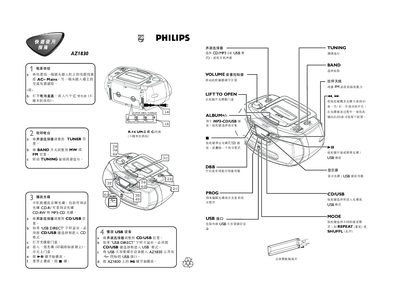
AZ1830 Computer Audio Quick Start Guide
This quick guide covers the basic operation of the AZ1830 computer audio system. It explains how to connect the power supply, either by plugging into an AC outlet or by inserting six C‑type batteries, and how to use the volume control.
The manual also describes how to select and use the radio tuner, play audio CDs (including CD‑R, CD‑RW and MP3‑CD), and operate the USB playback mode. Additional functions such as bass boost, repeat/shuffle modes, and track navigation are briefly outlined. This manual is written in Chinese.
Philips AZ1830 specifications
| Battery type | CR2025 lithium |
|---|---|
| Maximum audio files on USB | 800 |
| Maximum track sets on USB | 99 |
| Supported MP3 bitrate | 32‑320 kbps |
| Supported USB file systems | FAT12, FAT16, FAT32 |
All Philips AZ1830 documents by type
Day-to-day operation, settings and troubleshooting. Start here if the product is already set up.
The shortest path to a working setup, usually only a few pages.
Questions answered in these manuals
How do I start playback from CD or USB?
Select the CD/USB source and press the 2; key to begin playback.
How can I program a track sequence?
Press the PROG key to enter programming mode, choose track numbers with the ∞ or § keys, and store each selection by pressing PROG again.
How long can the AZ1830 play MP3‑CD or WMA‑CD?
It can play up to 10 hours on MP3‑CD and up to 20 hours on WMA‑CD.