
The user guide for Philips mobile phones introduces the basic operations and features of the phone. The guide emphasizes Philips' commitment to improving product performance and ensuring the accuracy of the user guide.
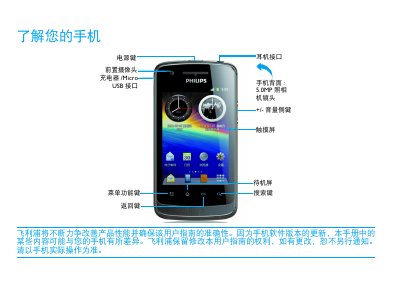
This guide introduces the Philips WA20 mobile phone, covering the layout of hardware buttons, the status bar, and how to navigate the standby screen. It explains the use of shortcut icons, basic touch gestures, and how to manage apps, contacts, messages, and multimedia functions.
Additional sections provide instructions for installing the USIM/SIM card, charging the device, safety precautions, and troubleshooting common issues such as battery performance, network connectivity, and display problems. This manual is written in Chinese.
Turn off the phone, remove the battery cover, take out the battery, then insert the USIM or SIM card as shown, and replace the battery cover.
Reduce screen brightness, disable unnecessary wireless functions, and follow the tips in the “How to extend battery usage time” section.