
This document is about the user guide for Philips mobile phones. It introduces the basic operations, standby screen, quick icons, and status bar functions of the phone. Users are reminded to refer to actual phone operations.
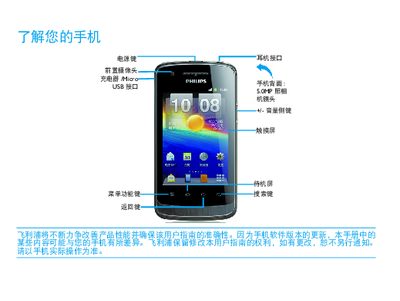
This manual introduces the Philips WA20 mobile phone, describing its hardware layout, standby screen functions, and how to use quick icons and basic operations such as calling, messaging, and navigating the interface.
It also provides instructions for installing the USIM/SIM card, charging the device, managing battery life, and troubleshooting common issues like network connectivity, Bluetooth, and Wi‑Fi. This manual is written in Chinese.
| Camera resolution | 50 MP |
|---|---|
| Wi‑Fi | Supported, connected |
| Bluetooth | Supported, enabled |
| Battery indicator | Shows charge level |
| SIM card type | USIM / SIM |
Short‑press the power key to turn the screen power on or off; long‑press opens the options menu.
Turn off the phone, remove the battery cover, insert the USIM (or SIM) card, then replace the cover and battery.
If the battery is completely discharged, the icon may not appear until a few minutes of charging have passed.