
Philips mobile phone user manual, introduces the phone's keys, lock screen interface, standby screen, stylus, application introduction and other contents
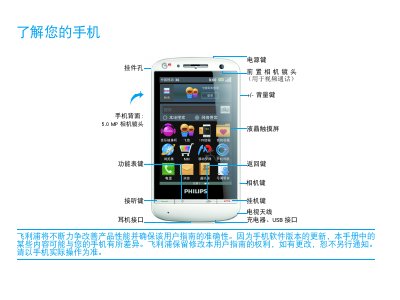
This manual introduces the Philips T910 mobile phone, describing its hardware buttons, camera (5.0 MP), and default standby screens. It explains how to navigate the lock screen, use shortcut menus, and customize the home screen with apps, wallpapers, and widgets.
The guide also covers installation steps such as inserting a Micro‑SD card, charging the battery, and connecting to a computer. Safety information, compliance with EN 60950, SAR limits, and troubleshooting tips for network, battery, and display issues are provided toward the end of the document. This manual is written in Chinese.
| Camera resolution | 5.0 MP |
|---|---|
| SAR value | 0.412 W/kg |
| Safety standard | EN 60950 |
Wait a few minutes (usually not more than 5 minutes) before the charging icon appears on the screen.
Remove the battery, reinstall it, then charge the phone until the battery indicator stops flashing before trying to power on again.
Bluetooth can be turned on from the settings menu; the status will show "Bluetooth已开启" when active.
The phone complies with the national SAR limit of 0.412 W/kg.