
Key facts
- Brand
- Philips
- Model
- HTS8150
- Documents
- 4
- Languages
- ZH
- Last added
- 2012-02-28
Start here
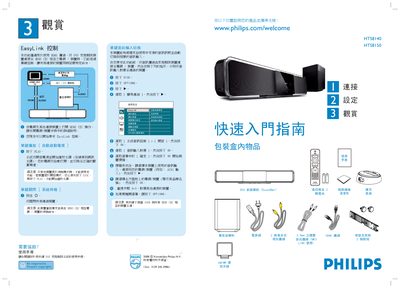
Philips HTS8140 / HTS8150 DVD Home Theater Quick Start Guide
The guide explains how to enable EasyLink control by connecting the DVD Home Theater to HDMI‑CEC compatible devices and using the on‑screen commands. It also covers the initial power‑on sequence, disc insertion, and automatic source detection.
Detailed instructions are provided for wiring the system: connect HDMI IN/OUT, AUX1, iPod Dock, and the dedicated sub‑woofer cable. Placement recommendations, room‑acoustic presets, and language selection steps help optimise sound performance. This manual is written in Chinese.
Philips HTS8150 specifications
| Image/Display | HD (720p, 1080i, 1080p) |
|---|---|
| Audio System | Ambisound, Dolby Digital decoder, DTS, Dolby Pro Logic II, Stereo |
| Speakers | 2 × 1‑inch Soft Dome tweeters, 6 × 2.5‑inch full‑range woofers |
| Subwoofer | 1 × 6.5‑inch long‑throw active, 4 Ω, 35‑200 Hz |
| Power Supply | 100‑240 VAC, 50/60 Hz |
| Dimensions (W×H×D) | 1047 mm × 174 mm × 154 mm |
| Weight | 8.9 kg |
Source: Philips HTS8150 SoundBar DVD Home Theatre Product Specification
All Philips HTS8150 documents by type
Day-to-day operation, settings and troubleshooting. Start here if the product is already set up.
The shortest path to a working setup, usually only a few pages.
Questions answered in these manuals
How can I power off all connected devices with one button?
Press and hold the 2 button to put the system into standby; this turns off the SoundBar and all HDMI‑CEC compatible devices.
What audio technologies does the HTS8150 use?
It uses Ambisound technology for 5.1 surround sound, along with Dolby Digital decoding, DTS, Dolby Pro Logic II, DoubleBass and Smart Surround enhancements.
From: Philips HTS8150 SoundBar DVD Home Theatre Product Specification
How does EasyLink work with the HTS8150?
EasyLink uses the HDMI‑CEC standard, allowing a single remote to control multiple HDMI‑connected devices through the HDMI cable.
From: Philips HTS8150 SoundBar DVD Home Theatre Product Specification