
Key facts
- Brand
- Philips
- Model
- V900
- Documents
- 2
- Languages
- ZH
- Last added
- 2012-03-06
Start here
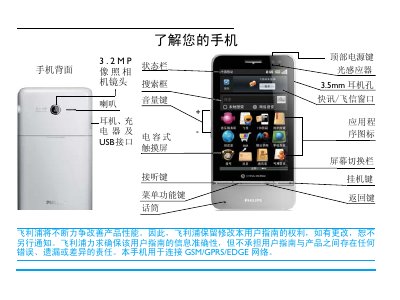
Philips V900 Mobile Phone User Manual
This manual provides step‑by‑step instructions for using the Philips V900 mobile phone, covering basic operations such as powering on, unlocking the screen, and making calls. It also describes how to navigate the three standby screens, add or remove application icons, and adjust settings like auto‑brightness.
Additional sections cover safety and compliance information, warranty and service details, and environmental specifications. The document is intended for end users who need guidance on everyday phone functions and maintenance. This manual is written in Chinese.
Philips V900 specifications
| Network Compatibility | GSM/GPRS/EDGE |
|---|---|
| Screen Type | Capacitive touch screen |
| Camera Resolution | 3.2 MP |
| SAR (Specific Absorption Rate) | 0.343 W/kg |
All Philips V900 documents by type
Day-to-day operation, settings and troubleshooting. Start here if the product is already set up.
Questions answered in these manuals
How do I turn the phone on?
Press and hold the top power key until the device starts.
How can I unlock the screen from sleep mode?
Press the top power key to light the screen, then drag the unlock icon to the indicated corner.
What is the battery capacity of the Philips V900 CTV900WHT?
The phone uses a 1450 mAh lithium‑ion battery.
Which type of memory card can be used with the phone and what is the maximum size?
It supports a Micro Secure Digital (MicroSD) card up to 8 GB.