
Key facts
- Brand
- Philips
- Model
- FWD186
- Category
- Hi-Fi
- Industry
- Appliances
- Documents
- 2
- Languages
- ZH · EN
- Last added
- 2012-01-22
Start here
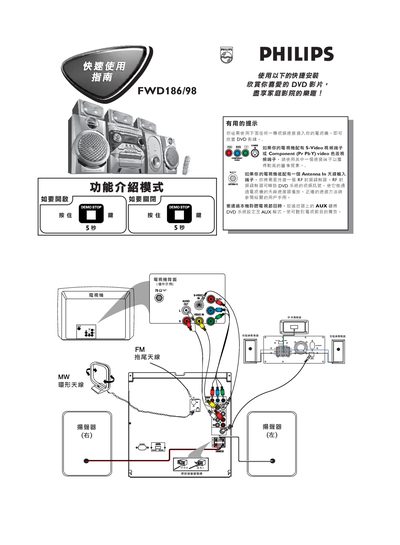
Philips FWD186/98 Quick Start Guide
This guide explains how to connect the Philips DVD player to a television. Use an S‑Video or Component (YPbPr) video cable for the best picture quality; if the TV only has an antenna (RF) input, connect an external RF modulator as described. The remote’s AUX key switches the player to AUX mode for TV program listening.
The DVD player supports plug‑and‑play operation. Power on the unit, press PLAY to start installation, insert a DVD (region ALL or 3), and playback begins automatically. Use the remote’s DISC, STOP, and menu keys to control playback. The package includes AAA batteries. This manual is written in Chinese.
Philips FWD186 specifications
| Output Power (PMPO) | 2800 W |
|---|---|
| Stereo Mode RMS Power | 2x30+3x30+60 W |
| Frequency Response | 150 Hz – 18 kHz ±3 dB |
| Signal‑to‑Noise Ratio | > 60 dB (VN‑weighted) |
| AUX Input Sensitivity | 500 mV |
| Standby Power Consumption | ≤ 10 W |
| Supported Video Formats | PAL / NTSC, 4:3 / 16:9 |
| Supported Audio Formats | MP3, WMA, Dolby Digital, DTS |
All Philips FWD186 documents by type
Day-to-day operation, settings and troubleshooting. Start here if the product is already set up.
The shortest path to a working setup, usually only a few pages.
Questions answered in these manuals
What DVD region codes does this player support?
It can play discs marked with the ALL region code or region 3.
How should the disc lens be cleaned?
Use Philips CD lens cleaning solution or a suitable commercial cleaner as described in the maintenance section.
What is the power consumption in standby mode?
The unit consumes 10 W or less while in standby.