
This document introduces the installation and usage methods of a DVD player, including steps such as connecting to a TV and speakers, and playing discs.
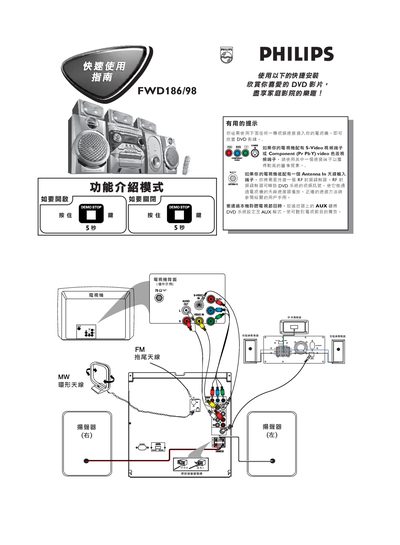
This guide explains how to connect the Philips DVD player to a television. Use an S‑Video or Component (YPbPr) video cable for the best picture quality; if the TV only has an antenna (RF) input, connect an external RF modulator as described. The remote’s AUX key switches the player to AUX mode for TV program listening.
The DVD player supports plug‑and‑play operation. Power on the unit, press PLAY to start installation, insert a DVD (region ALL or 3), and playback begins automatically. Use the remote’s DISC, STOP, and menu keys to control playback. The package includes AAA batteries. This manual is written in Chinese.
| Supported DVD region codes | ALL or region 3 |
|---|---|
| Included batteries | AAA (white, red, blue, etc.) |
It can play discs marked with the ALL region code or region 3.