
This manual introduces the basic operation methods of Philips mobile phones, including turning on and off, making calls, receiving calls, checking new SMS/unanswered calls, selecting input methods, returning to the standby screen, turning on/off silent mode, one-key Internet access, and one-key deletion.
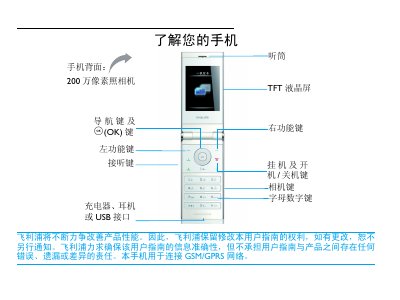
This user manual explains how to operate the Philips F610 mobile phone. It describes the layout of the device, the function of navigation and OK keys, and provides step‑by‑step instructions for making calls, sending messages, using the camera, browsing the web, and accessing multimedia features.
The guide also covers essential setup tasks such as inserting SIM cards, charging the battery, inserting a Micro‑SD card, configuring the clock, and adjusting settings like shortcuts and power‑saving mode. Safety notices, warranty information, and regulatory compliance details are included at the end of the document. This manual is written in Chinese.
| Camera resolution | 2 MP |
|---|---|
| SAR (specific absorption rate) | 0.798 W/kg |
Enter the phone number using the numeric keypad and press the (or $) key to dial.
Yes, the phone can be used while the charger is connected; disconnect the charger after the battery is fully charged to avoid over‑charging.