
This manual introduces the basic functions and usage of Philips phone, including how to make phone calls, receive and send messages, and use some common functions on the phone.
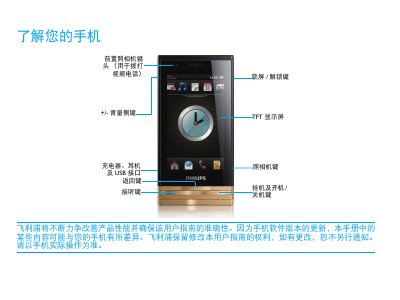
This manual introduces the Philips D812 mobile phone, describing its main keys, standby screen, widgets, and quick‑icon functions. It explains how to make calls, send messages, use the camera, and access various applications.
The guide also covers installation of the UIM/SIM card, battery charging, Micro‑SD card handling, safety precautions, and troubleshooting steps for common issues such as power‑on problems, battery life, and network connectivity. This manual is written in Chinese.
Remove the battery cover, insert the UIM/SIM card, then replace the battery cover.
Yes, the phone can be used during charging; the battery icon will show the charge status.
Remove and reinstall the battery, then charge it until the battery indicator stops flashing before trying to power on again.