
This file is the user manual of Philips DVD Player 5980K
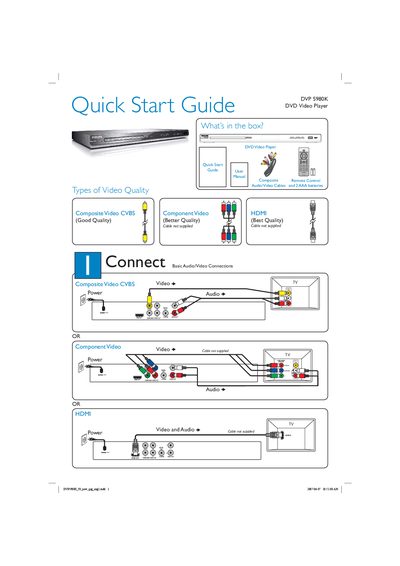
This guide provides an overview of the items included with the DVP 5980K DVD Video Player, basic audio/video connection options, and quick start instructions. It shows the box contents, explains composite, component and HDMI video quality options, and lists the required cables and remote control.
The guide walks you through powering on the unit, selecting the TV channel, choosing the menu language, and starting disc playback. It also includes troubleshooting tips for common issues such as no power, no picture, no sound, and remote‑control problems.
| Power Supply | AC power cord required |
|---|
Press the STANDBY‑ON button on the top panel of the unit.
Check that the TV is set to the correct input and that all video cables are firmly connected.