
This manual introduces the hardware connection and software settings of the TL-WR340G+ wireless broadband router, which is suitable for Windows 2000/XP and Windows Vista/7 systems.
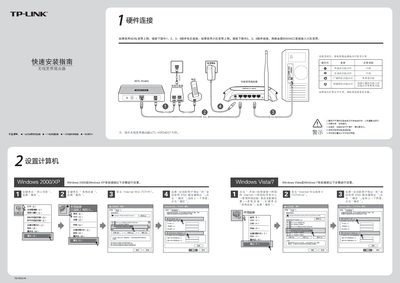
The guide provides step‑by‑step instructions for hardware connection, checking LED indicators, and preparing the router for use. It covers both ADSL and cable WAN setups and explains how to verify that the power, WAN, LAN and wireless LEDs show normal status.
It then walks the user through configuring the router via a web browser (default address 192.168.1.1), setting up the internet connection, configuring wireless SSID and security, and troubleshooting common issues such as missing wireless signal or forgotten login credentials. This manual is written in Chinese.
| Default IP address | 192.168.1.1 |
|---|---|
| Default username/password | admin / admin |
Make sure the wireless function on the computer is turned on, the signal strength is sufficient, and the router is positioned to provide good coverage.
Press the reset button on the router for about 10 seconds, then release it to restore factory defaults and start the setup again.