
Key facts
- Brand
- Omron
- Model
- MC-670
- Category
- Home medical equipment
- Industry
- Health
- Documents
- 2
- Languages
- ZH
- Last added
- 2012-04-12
Start here
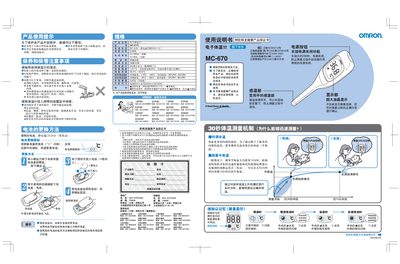
Omron MC-670 Electronic Thermometer User Manual
This manual explains how to safely use the Omron MC-670 electronic thermometer, including important safety warnings, proper storage, and cleaning instructions. It also details battery replacement procedures and warranty information.
The document describes the measurement method, showing that the device can predict a 10‑minute equilibrium temperature in about 30 seconds and perform an actual measurement in roughly 10 minutes. Technical specifications such as measurement range, accuracy, power consumption, and dimensions are listed, along with troubleshooting tips for common errors. This manual is written in Chinese.
Omron MC-670 specifications
| Power supply voltage | DC 3.0 V (CR2016 x1) |
|---|---|
| Power consumption | 0.02 W |
| Estimated measurement count | ≈ 1100 times (predicted) |
| Sensor type | Thermistor |
| Display | 3‑digit numeric, 0.1 °C resolution |
| Measurement accuracy | ±0.1 °C (at 23 °C) |
| Measurement range | 32.0 °C – 42.0 °C |
| Operating temperature / humidity | +10 °C – +40 °C, 30 %RH – 85 %RH |
| Storage temperature / humidity | -20 °C – +60 °C, 10 %RH – 95 %RH |
| Weight (incl. battery) | ≈ 27 g |
| Dimensions | 34 mm × 125 mm × 15 mm (W × H × D) |
| Battery type | Lithium CR2016 (retail) |
All Omron MC-670 documents by type
Day-to-day operation, settings and troubleshooting. Start here if the product is already set up.
Questions answered in these manuals
What is the measurement range of the MC-670?
The thermometer measures temperatures from 32.0 °C to 42.0 °C.
How do I replace the battery?
Remove the back cover with a small screwdriver and insert a new CR2016 battery with the correct polarity.
What does the flashing "C" symbol mean?
The flashing "C" indicates that the thermometer is performing the temperature prediction.