
Key facts
Start here
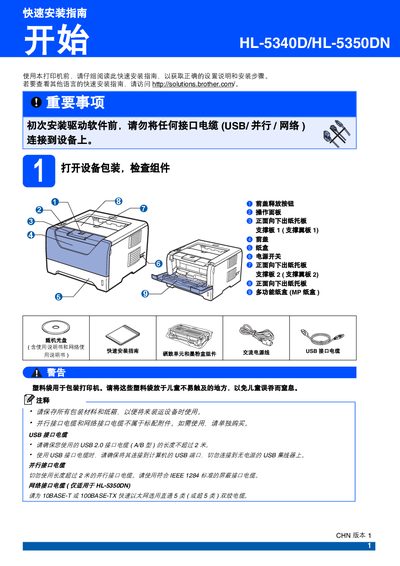
Brother HL-5340D/HL-5350DN Printer Quick Installation Guide
The guide provides step‑by‑step instructions for the initial setup of the Brother HL‑5340D/HL‑5350DN printer. It covers unpacking, removing protective tape, installing the drum unit and toner cartridge, loading paper, connecting power and interface cables, and printing a test page to verify proper operation.
Additional sections describe safety warnings, optional accessories such as a low‑tray unit and memory module to increase paper capacity, and where to find consumable information and driver software online. This manual is written in Chinese.
Brother HL-5340D specifications
| Low‑tray paper capacity | 250 sheets |
|---|---|
| Maximum paper capacity with memory module | 550 sheets |
| Supported paper width (larger) | 130 mm (5.12 in) |
| Interface cables | USB, parallel, network |
Source: Brother HL-5340D/HL-5350DN Printer Quick Installation Guide
All Brother HL-5340D documents by type
Day-to-day operation, settings and troubleshooting. Start here if the product is already set up.
The shortest path to a working setup, usually only a few pages.
Questions answered in these manuals
What should I do before cleaning the printer?
Turn off the power and unplug the printer before cleaning the interior.
From: Brother HL-5340D / HL-5350DN / HL-5370DW Laser Printer User Manual
How do I perform double‑sided printing?
Use the manual or automatic duplex printing options described in the double‑sided printing sections of the manual.
From: Brother HL-5340D / HL-5350DN / HL-5370DW Laser Printer User Manual
Should I connect the printer to a computer before installing the driver?
No. The guide states you must not connect any interface cable (USB, parallel, or network) before installing the driver software.
From: Brother HL-5340D/HL-5350DN Printer Quick Installation Guide
How can I print a test page after setup?
Turn on the printer, wait for the pre‑heat indicator to flash green, then press the Go (Start) button to print a test page and verify the output.
From: Brother HL-5340D/HL-5350DN Printer Quick Installation Guide