
Key facts
Start here
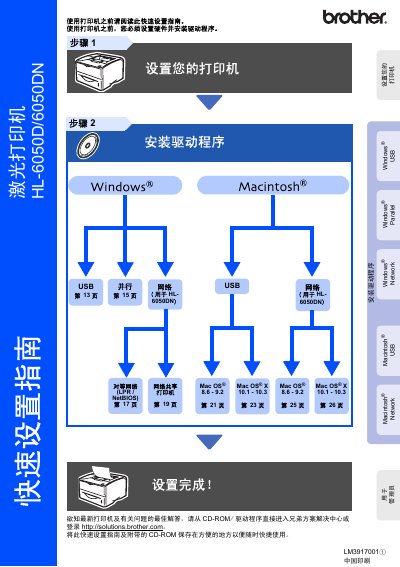
Brother HL-6050D/6050DN Quick Start Guide
The guide walks you through installing the printer, connecting it via USB, Parallel or Network, and configuring the initial driver software from the supplied CD‑ROM or Brother Solutions Center. It also covers safety precautions, such as proper grounding and avoiding contact with internal laser components.
Additional sections explain the control panel functions, basic troubleshooting steps, and optional accessories that can be added to enhance performance. Packaging and shipping instructions are included for safe transport and replacement of the unit. This manual is written in Chinese.
All Brother HL-6050 documents by type
Disassembly, diagnostics and part numbers, for repair.
Day-to-day operation, settings and troubleshooting. Start here if the product is already set up.
The shortest path to a working setup, usually only a few pages.
Questions answered in these manuals
How should I safely clean the printer?
Before cleaning, turn off the power switch and unplug the printer from the AC outlet.
From: brother Laser Printer HL-6050 HL-6050D HL-6050DN users guide
What should I avoid when handling the power plug?
Do not handle the plug with wet hands to prevent electrical shock.
From: brother Laser Printer HL-6050 HL-6050D HL-6050DN users guide
How can I connect the printer to a network?
Use the LAN port on the printer and configure the network settings as described in the guide.