
HL-5340D/HL-5350DN is a printer product. This document introduces its quick installation guide and component inspection.
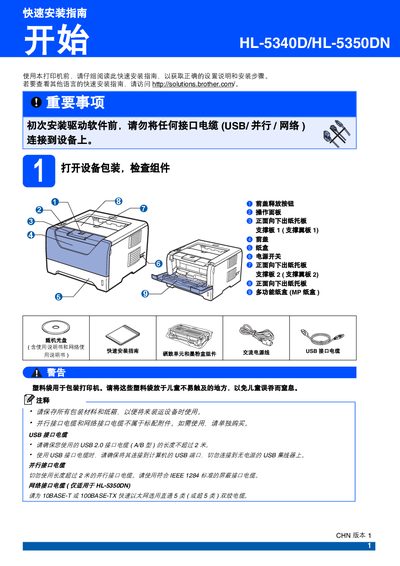
The guide provides step‑by‑step instructions for the initial setup of the Brother HL‑5340D/HL‑5350DN printer. It covers unpacking, removing protective tape, installing the drum unit and toner cartridge, loading paper, connecting power and interface cables, and printing a test page to verify proper operation.
Additional sections describe safety warnings, optional accessories such as a low‑tray unit and memory module to increase paper capacity, and where to find consumable information and driver software online. This manual is written in Chinese.
| Low‑tray paper capacity | 250 sheets |
|---|---|
| Maximum paper capacity with memory module | 550 sheets |
| Supported paper width (larger) | 130 mm (5.12 in) |
| Interface cables | USB, parallel, network |
No. The guide states you must not connect any interface cable (USB, parallel, or network) before installing the driver software.
Turn on the printer, wait for the pre‑heat indicator to flash green, then press the Go (Start) button to print a test page and verify the output.