
Key facts
- Brand
- Brother
- Model
- FAX-4100
- Category
- Fax machine
- Industry
- Computers
- Documents
- 3
- Languages
- EN
- Last added
- 2012-07-02
Start here
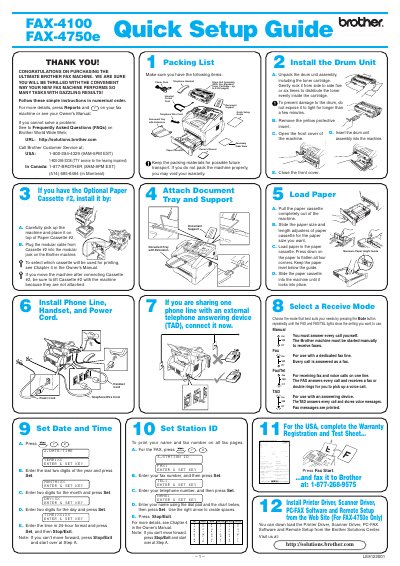
Brother FAX-4100/FAX-4750e Quick Setup Guide
This document provides a step-by-step quick setup guide for the Brother Ultimate Fax Machine models FAX-4100 and FAX-4750e. It covers essential initial steps such as unpacking the drum unit assembly, installing the paper cassette, connecting phone lines and power cords, and attaching the document tray.
Read onlineBrother FAX-4100 specifications
| Toner capacity (TN‑430) | 3000 pages |
|---|---|
| Toner capacity (TN‑460) | 6000 pages |
| Expandable memory board (option) | 16 MB |
Source: Brother FAX-4100 / FAX-4750e / FAX-5750e User Manual
All Brother FAX-4100 documents by type
Day-to-day operation, settings and troubleshooting. Start here if the product is already set up.
The shortest path to a working setup, usually only a few pages.
Questions answered in these manuals
How many times should you rock the drum unit assembly to distribute toner?
You should gently rock the drum unit assembly from side to side five or six times.
What is the maximum page yield for the included standard toner cartridge?
The included standard toner cartridge is rated for up to 3,000 pages.
How can I get instant answers to common technical questions?
You can use the Brother fax-back system, which is available 24 hours a day, 7 days a week.
What is the warranty period for this product?
The warranty covers defects in materials and workmanship for one year from the date of purchase.
What is the warranty period for these fax machines?
The limited warranty is one year from the date of purchase; consumable items are covered for 90 days.
Where can I order accessories for my fax machine?
In the USA, call 1‑888‑879‑3232 (voice) or 1‑800‑947‑1445 (fax) to order genuine Brother accessories.