
Key facts
- Brand
- Brother
- Model
- FAX-5750E
- Category
- Fax machine
- Industry
- Computers
- Documents
- 4
- Languages
- EN
- Last added
- 2012-07-02
Start here
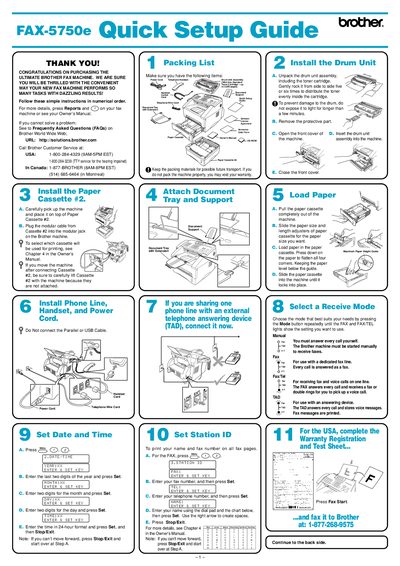
Brother FAX-5750E Fax Machine Quick Setup Guide
This guide walks you through unpacking the FAX-5750E, installing the drum unit, loading paper cassettes, and connecting the fax to a computer via parallel, USB, or network cables. It also explains how to install the Brother drivers and optional software from the supplied CD‑ROM.
For networked installations, the guide details configuring the fax’s IP address, subnet mask, and gateway using the control panel, as well as the default password (access) for the print server and the use of BRAdmin Professional tools.
Brother FAX-5750E specifications
| Parallel cable requirement | Shielded IEEE 1284‑compliant cable |
|---|---|
| USB cable length limit | Maximum 6 feet (1.8 m) |
| Default network password | access |
All Brother FAX-5750E documents by type
Day-to-day operation, settings and troubleshooting. Start here if the product is already set up.
The shortest path to a working setup, usually only a few pages.
Questions answered in these manuals
Where can I register my Brother product?
You can register your product on-line at http://www.brother.com/registration/.
Who should I call for technical help in the USA?
You must call the country where you bought the machine, specifically 1-800-284-4329 for fax machines.
How can I get instant answers to common technical questions?
You can use the Brother fax-back system, which is available 24 hours a day, 7 days a week.
What is the warranty period for this product?
The warranty covers defects in materials and workmanship for one year from the date of purchase.
How do I set the fax IP address?
Press the 4 key on the control panel, select 1 to change the IP address, enter the address, press Set, then press Stop/Exit.
What is the default password for the print server?
The default password is “access”.