
Key facts
- Brand
- Brother
- Model
- MFC-J265W
- Category
- All-in-one printer
- Industry
- Computers
- Documents
- 2
- Languages
- EN · ZH
- Last added
- 2012-03-16
Start here
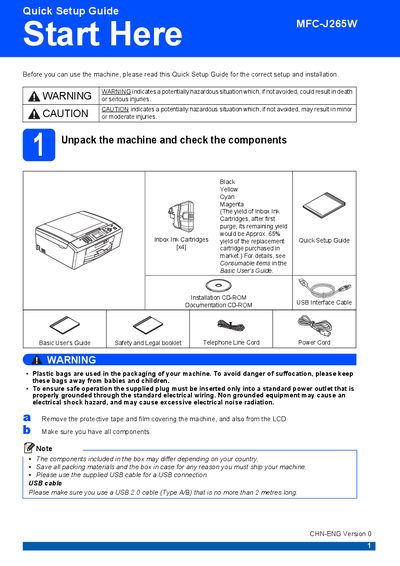
Brother MFC-J265W Quick Setup Guide
This Quick Setup Guide walks you through the initial setup of the Brother MFC‑J265W, covering safety warnings, unpacking, power and telephone connections, paper loading, ink cartridge installation, and basic configuration such as language, LCD contrast, date/time, and network settings. Follow each section to get the printer ready for first use and ensure reliable operation.
Key sections include loading plain A4 paper, installing the four ink cartridges, checking print quality, selecting receive mode for fax/telephone, adjusting LCD contrast, setting the date and time, restoring network defaults, entering wireless network credentials, and information on replacement consumables and genuine Brother ink.
Brother MFC-J265W specifications
| Ink cartridge part numbers | Black LC975BK, Yellow LC975Y, Cyan LC975C, Magenta LC975M |
|---|---|
| Ink yield after first purge | ≈65% |
| USB cable requirement | USB 2.0 Type A/B, ≤2 m |
All Brother MFC-J265W documents by type
The shortest path to a working setup, usually only a few pages.
Questions answered in these manuals
How can I change the fax reception mode?
Press the function key, select initial settings, choose the desired receive mode, confirm with OK, and exit; the LCD will display the current mode.
From: Brother MFC-J265W Multifunction Printer Quick Installation Guide
What should I do if the USB cable is longer than 2 m?
Use a USB 2.0 cable that does not exceed 2 meters in length, as longer cables are not supported.
From: Brother MFC-J265W Multifunction Printer Quick Installation Guide