
Key facts
- Brand
- Panasonic
- Model
- WV-PB5508
- Category
- Player
- Industry
- Appliances
- Documents
- 2
- Languages
- EN
- Last added
- 2012-08-08
Start here
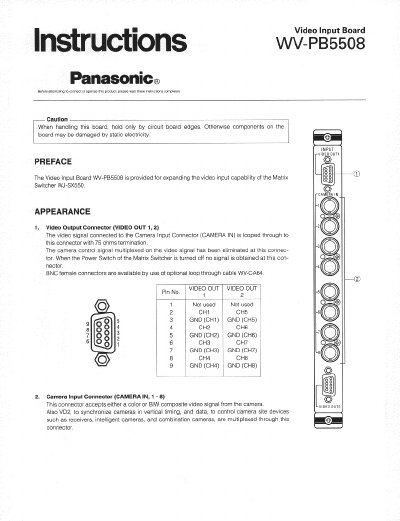
Panasonic WV-PB5508 Video Input Board Instructions
This document provides instructions for the Panasonic WV-PB5508 Video Input Board, which expands the video input capability of the Matrix Switcher WJ-SX550. It details the board's appearance, including video output and camera input connectors, and explains how to set the switches for specific camera inputs.
Read onlinePanasonic WV-PB5508 specifications
| Camera Input | 8 inputs |
|---|---|
| Video Output | 2 outputs |
| Video Signal | 1.0 Vp-p/75 Ω composite video |
| Data Signal | 0.5 Vp-p/75 Ω data, 2.5 Vp-p/75 Ω vertical timing |
| Dimensions | 24.5 × 265 × 260 mm (W × H × D) |
| Weight | 450 g (1.0 lb) |
| Cable Compensation | S, M, L (Short, Middle, Long) |
| Vertical Drive Output | On/Off |
| Connector Type | 9‑pin D‑Sub |
| Camera Site Control | All Input |
Source: Panasonic WV-PB5508E Video Input Board Installation Guide
All Panasonic WV-PB5508 documents by type
Day-to-day operation, settings and troubleshooting. Start here if the product is already set up.
Mounting, wiring and first power-up. Read it before the hardware goes in.
Questions answered in these manuals
What is the purpose of the WV-PB5508 board?
The Video Input Board WV-PB5508 is provided for expanding the video input capability of the Matrix Switcher WJ-SX550.
Who should install this board?
Installation should be made by qualified service personnel or system installers.
How should the board be installed?
Turn off the power, remove the four rear‑panel screws, take off the panel, slide the board into a slot, and tighten the two mounting screws.
From: Panasonic WV-PB5508E Video Input Board Installation Guide
What switch settings are required for camera inputs?
Set the SW1 switches on the board to match the desired camera input number; the factory default is inputs 1‑8.
From: Panasonic WV-PB5508E Video Input Board Installation Guide