
Key facts
- Brand
- NEC
- Model
- LT140
- Industry
- Electronics
- Documents
- 13
- Languages
- EN · SV · ES · IT · DE · FR
- Last added
- 2012-08-02
Start here
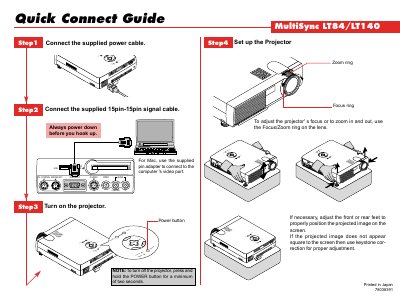
LT140 Projector Quick Connect Guide
This Quick Connect Guide shows how to attach the power cable, the 15‑pin signal cable, and adjust the projector's focus, zoom, and keystone settings. It also explains how to power the unit on and off safely.
The optional LT40RT remote control mouse kit lets you operate the computer's mouse from the projector. Instructions cover connecting the serial cable, using the remote's buttons, and re‑activating the computer's built‑in mouse control.
NEC LT140 specifications
| Power Supply | 100-120 or 200-240 V 50/60 Hz AC |
|---|---|
| Acoustic Noise | less than 70 dB (A) |
| Lamp Life | 1000 hours |
Source: NEC MultiSync LT84/LT140 Ultra-Portable Projector User's Manual
All NEC LT140 documents by type
Day-to-day operation, settings and troubleshooting. Start here if the product is already set up.
- NEC MultiSync LT84/LT140 Ultra-Portable Projector User's Manual 45 p
- NEC MultiSync LT84/LT140 Ultra-Portable Projector User's Manual 45 p
- NEC LT140 Remote Control User Manual 65 p
- NEC MultiSync LT84/LT140 Projector User Manual 43 p
- NEC LT140 Remote Control User Manual 65 p
- NEC LT140 Remote Control User Manual 65 p
- NEC LT140 User Manual 65 p
- NEC LT140 Remote Control User Manual 65 p
- NEC LT84/LT140 User Manual 43 p
- NEC LT140 Remote Control User Manual 65 p
- NEC LT140 Remote Control User Manual 59 p
The shortest path to a working setup, usually only a few pages.
Questions answered in these manuals
Where is the serial number located?
The serial number is located under the name plate label on the left side of the projector.
From: NEC MultiSync LT84/LT140 Ultra-Portable Projector User's Manual
Can I install the projector on the ceiling myself?
No, the projector must be installed by qualified technicians to ensure proper operation and reduce the risk of injury.
From: NEC MultiSync LT84/LT140 Ultra-Portable Projector User's Manual
Where is the serial number located?
The serial number is located under the name plate label on the left side of the projector.
From: NEC MultiSync LT84/LT140 Ultra-Portable Projector User's Manual
Can I install the projector myself?
No, ceiling installation must be performed by qualified technicians to ensure proper operation and safety.
From: NEC MultiSync LT84/LT140 Ultra-Portable Projector User's Manual
How do I automatically adjust the projected image?
Press the AUTO ADJUST button; it automatically adjusts vertical/horizontal position, clock frequency/phase, and resolution when the image is off‑center, has vertical bars, or flickers.
How can I switch the mouse button mode between projector and computer?
Press the COMPUTER/PJ SELECT button; it lights red and changes the mouse buttons to projector mode, and pressing it again returns to computer mode.