
Key facts
Start here
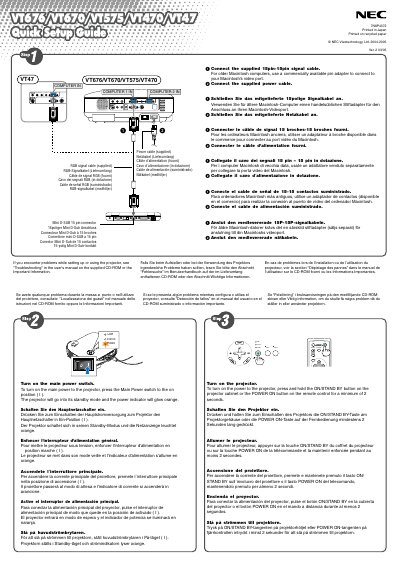
NEC VT676/VT670/VT575/VT470/VT47 Projector Quick Start Guide
This guide shows how to connect the supplied power and 15‑pin RGB signal cables to the projector. For older Macintosh computers, a pin adapter is required. After connecting, turn on the projector by pressing the Main Power switch or holding the ON/STAND BY button for at least two seconds; the power indicator will glow orange.
Select the video source using the COMPUTER 1 or COMPUTER 2 button on the remote. Use the AUTO ADJ. button for automatic RGB image optimization. Adjust the tilt foot, zoom lever, and focus ring as needed, and enable Auto Keystone correction to correct vertical distortion automatically.
NEC VT670 specifications
| Operating Voltage | 100‑240 V AC 50/60 Hz |
|---|---|
| Minimum Wall Clearance | 10 cm |
| Maximum Tilt Angle | 10 degrees |
Source: NEC VT676/VT670/VT575/VT470/VT47 Projector User Manual
All NEC VT670 documents by type
Day-to-day operation, settings and troubleshooting. Start here if the product is already set up.
- NEC VT676/VT670/VT575/VT470/VT47 Projector User Manual 80 p
- NEC VT676/VT670/VT575/VT470/VT47 Projector User Manual 80 p
- NEC VT676/VT670/VT575/VT470/VT47 Projector User Manual 80 p
- NEC VT676/VT670/VT575/VT470/VT47 Projector User Manual 80 p
- NEC VT670/VT570/VT470/VT47 Projector User Manual 83 p
- NEC VT670/VT570/VT470/VT47 Projector User Manual 83 p
- NEC VT670/VT570/VT470/VT47 Projector User Manual 83 p
- NEC VT670/VT570/VT470/VT47 Projector User Manual 83 p
- NEC VT670/VT570/VT470/VT47 Projector User Manual 83 p
- NEC VT670/VT570/VT470/VT47 Projector User Manual 83 p
The shortest path to a working setup, usually only a few pages.
Questions answered in these manuals
How do I connect the signal cable to a Macintosh computer?
Connect the supplied 15‑pin signal cable and use a commercially available pin adapter for older Macintosh video ports.
From: NEC VT676/VT670/VT575/VT470/VT47 Projector Quick Start Guide
How can I automatically correct vertical image distortion?
Enable Auto Keystone correction; it automatically corrects vertical distortion without any special operation.
From: NEC VT676/VT670/VT575/VT470/VT47 Projector Quick Start Guide
How can I replace the lamp?
Follow the instructions on page 50 and replace the lamp when the on‑screen message indicates the lamp has reached the end of its life.
From: NEC VT676/VT670/VT575/VT470/VT47 Projector User Manual
When must the lamp be replaced?
Replace the lamp when the display shows the message that the lamp life has ended.
From: NEC VT676/VT670/VT575/VT470/VT47 Projector User Manual
What safety precautions are required before servicing the projector?
Always disconnect the power plug, never open the housing, keep the ventilation outlet untouched, avoid touching internal high‑voltage parts, and let qualified NEC service personnel perform any repairs.
From: NEC VT676/VT670/VT575/VT470/VT47 Projector User Manual
How far should the projector be placed from walls?
Maintain at least a 10 cm gap between the projector and any surrounding walls to ensure proper ventilation.
From: NEC VT676/VT670/VT575/VT470/VT47 Projector User Manual