
Key facts
Start here
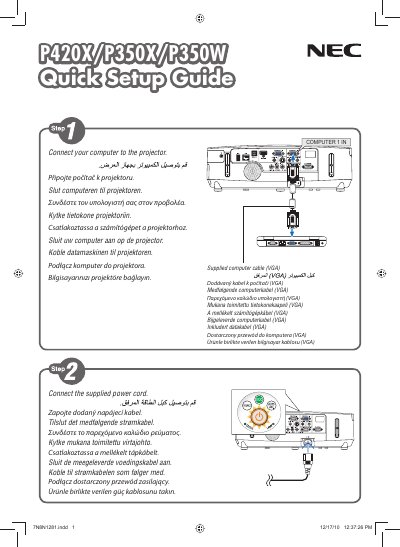
NEC P420X/P350X/P350W Projector Quick User Manual
This quick user manual provides essential information for installing and operating NEC P420X, P350X and P350W projectors. It includes safety notices, basic connection steps, power‑on and power‑off procedures, and brief troubleshooting tips.
The guide is intended for end users who need fast reference to get the projector up and running. It contains concise instructions, key button functions, and safety warnings to ensure reliable performance.
NEC P350X specifications
| Power supply | 100‑240 V AC 50/60 Hz |
|---|---|
| Lamp type | High‑pressure mercury lamp |
| Minimum ventilation clearance | At least 10 cm from wall |
| Altitude mode threshold | Set fan to HIGH above ~1 600 m |
All NEC P350X documents by type
Day-to-day operation, settings and troubleshooting. Start here if the product is already set up.
- NEC P420X/P350X/P350W Projector User Manual 215 p
- NEC P420X/P350X/P350W Projector User Manual 215 p
- NEC P420X/P350X/P350W Projector User Manual 215 p
- NEC P420X / P350X / P350W Projector User Manual 215 p
- NEC P420X P350X P350W Projector User Manual 215 p
- NEC P420X/P350X/P350W Projector User Manual 215 p
- NEC P420X/P350X/P350W Projector User Manual 215 p
The shortest path to a working setup, usually only a few pages.
Questions answered in these manuals
How do I turn the projector off?
Press the POWER OFF button.
How do I turn the projector off?
Use the power‑off procedure described in the manual’s POWER OFF section.
Where was this manual printed?
It was printed in China by NEC Display Solutions.
How do I replace the lamp safely?
Use only the specified lamp, let the lamp cool for at least an hour after power‑off, and follow the detailed steps on page 147. If the lamp has burned out, have the dealer replace it.
What must be done when using the projector at high altitude?
Set the fan mode to HIGH (Altitude) to prevent overheating at elevations of 1 600 m or higher.