
Key facts
- Brand
- NEC
- Model
- LT158
- Industry
- Electronics
- Documents
- 5
- Languages
- ES · DE · EN
- Last added
- 2012-05-10
Start here
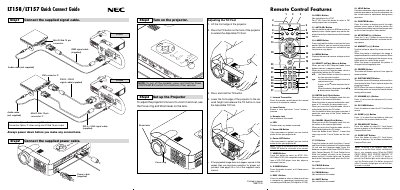
NEC LT158 Quick Connect Guide
This guide walks users through the initial setup of the NEC LT158 projector, covering cable connections, power-up procedures, and basic adjustments such as focus, zoom, and keystone correction. It also explains the functions of the remote control buttons and how to switch between projector and computer modes.
Additional sections include a menu tree reference, troubleshooting tips, and common problem solutions to help resolve issues like power failures, image distortion, and remote control problems.
NEC LT158 specifications
| Lamp power | 130 W |
|---|---|
| Maximum projection size | 300 inches diagonal |
| Supported resolution (max) | UXGA 1600 × 1200 |
| Ventilation clearance | at least 10 cm (3 inches) from wall |
Source: NEC LT158/LT157 User Manual
All NEC LT158 documents by type
Day-to-day operation, settings and troubleshooting. Start here if the product is already set up.
The shortest path to a working setup, usually only a few pages.
Questions answered in these manuals
How should the projector be installed to ensure safety?
Install the projector on a flat, dry surface away from direct sunlight, heat sources, and ensure the power cord is unplugged before servicing. Keep at least 10 cm clearance from walls for ventilation.
How do I replace the lamp safely?
Wait at least one minute after turning the projector off before removing the lamp, avoid touching broken glass, and contact an NEC qualified service technician for replacement.
What ventilation clearance is required around the projector?
Keep at least 10 cm of space between the projector and the wall and ensure the ventilation openings remain unobstructed.
How do I replace the lamp in the LT158/LT157 projector?
Turn off the projector, wait for the lamp to cool, then follow the instructions on page S‑48 to remove the old lamp and install a new one, ensuring at least one minute between turning the lamp off and on again.
How do I turn off the projector?
Press and hold the Power OFF button for a minimum of two seconds.
What does the AUTO ADJ button do?
It adjusts an RGB source for an optimal picture; some signals may not display correctly or take time to switch.