
Key facts
- Brand
- NEC
- Model
- VT540
- Industry
- Electronics
- Documents
- 6
- Languages
- EN · IT
- Last added
- 2012-08-02
Start here
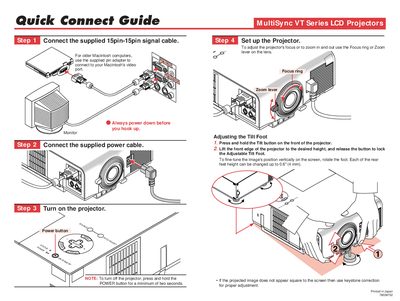
NEC vt540_qg_e guide
This guide provides step‑by‑step instructions for connecting the supplied 15‑pin signal cable, adjusting focus, zoom, and the tilt foot, and powering the projector on. It also explains how to use keystone correction and basic remote‑control functions.
The document details the projector’s on‑screen menus, including source selection, image options, language settings, and pointer controls, helping users fine‑tune picture quality and navigate the interface efficiently.
NEC VT540 specifications
| Lamp power | 160 W (130 W Eco mode) |
|---|---|
| Lamp life | up to 3000 hours |
| Input voltage | 100‑120 V / 200‑240 V, 50/60 Hz |
| Zoom range | 25‑300 inches diagonal |
All NEC VT540 documents by type
Day-to-day operation, settings and troubleshooting. Start here if the product is already set up.
The shortest path to a working setup, usually only a few pages.
Questions answered in these manuals
When should I replace the lamp?
Replace the lamp when the message 'The lamp has reached the end of its usable life. Please replace the lamp.' appears.
Can I install the projector on the ceiling myself?
No, the projector must be installed by qualified technicians to ensure proper operation and reduce the risk of injury.
What is the NEC MultiSync VT440/VT540?
It is an LCD projector designed for use in a darkened room.
How much space is required between the projector and a wall?
You must allow at least 3 inches (10 cm) of space.
How do I know when the lamp needs to be replaced?
Replace the lamp as soon as the message “La lampada è arrivata a fine vita. Per favore sostituire la lampada.” appears on the screen.
What power cable should be used in the United Kingdom?
Use a BS‑approved power cable with a three‑prong plug and a black fuse, as required for UK installations.