
Key facts
- Brand
- NEC
- Model
- LT180
- Industry
- Electronics
- Documents
- 4
- Languages
- EN · DE · FR
- Last added
- 2012-05-10
Start here
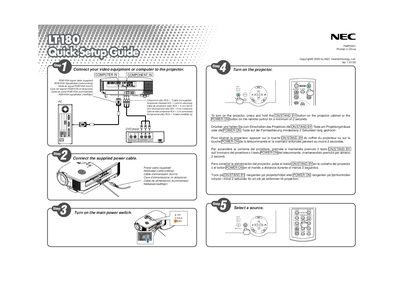
NEC lt180 Projector Quick Setup Guide
This guide provides the essential steps to get the NEC lt180 projector up and running. It includes multilingual instructions for powering the unit and basic connection options.
The document lists the available video inputs (RGB/VGA) and describes how to select the correct source. It also gives brief safety notes and button functions for the projector cabinet and remote control.
NEC LT180 specifications
| Input voltage | 100‑240 V AC 50/60 Hz |
|---|---|
| Native resolution | 1024 × 768 |
| Noise level | < 34 dB (Eco‑Mode) |
All NEC LT180 documents by type
Day-to-day operation, settings and troubleshooting. Start here if the product is already set up.
The shortest path to a working setup, usually only a few pages.
Questions answered in these manuals
What video input connectors are supported?
The projector accepts RGB and VGA video signals.
How should the projector be turned off safely?
Unplug the mains power cord from the outlet before leaving the projector unattended.
When should the lamp be replaced?
Replace the lamp when the message “End of lamp life reached – please replace the lamp” appears, following the instructions on page G‑44.
Can I install the LT180 projector on the ceiling myself?
No. The projector must be installed by qualified technicians and the ceiling must be strong enough to support it.
From: NEC LT180 User Manual
How much clearance is required for ventilation?
Leave at least 4 inches (10 cm) between the projector and the wall.
From: NEC LT180 User Manual
Can I mount the LT180 on a ceiling myself?
No. Ceiling installation must be performed by qualified technicians and the ceiling must be strong enough to support the projector in accordance with local building codes.