
Key facts
Start here
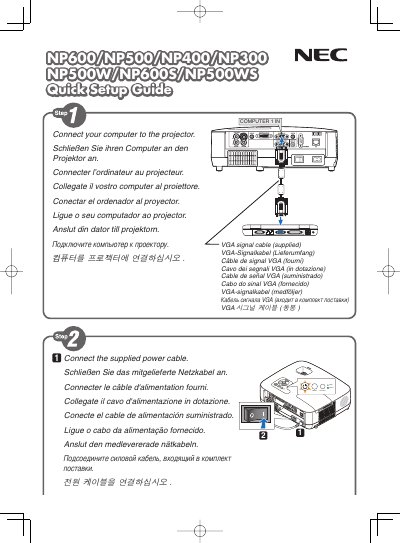
NEC NP600/NP500/NP400/NP300/NP500W/NP600S/NP500WS Quick Setup Guide
The guide provides quick installation steps for NEC NP600 series displays, covering connection of video sources and basic menu navigation.
It explains key functions such as the AUTO ADJ button for automatic image optimization, Digital Zoom, Auto Keystone Off, Wall Color, Lamp Mode, and other display settings.
NEC NP500W specifications
| LCD panel size | 0.63 inch |
|---|---|
| Resolution | 1024 × 768 px (NP600/NP500/NP500C) / 1280 × 800 px (NP500W+) |
| Lamp wattage | 230 W (NP600+) / 210 W (others) |
| Brightness | 3500 lumens (NP600+) |
| Contrast ratio | 500:1 |
| Projection distance | 0.7 – 11.3 m |
| Input connectors | 1 × RGB/D‑Sub 15, 1 × RGB/DVI‑I 29, 1 × S‑Video, 1 × RCA video, 1 × RCA audio, 2 × mic audio |
| Built‑in speaker | 7 W mono |
Source: NEC NP600+/NP500+/NP500C/NP400+/NP400C/NP500W+ Portable Projector User Manual
All NEC NP500W documents by type
The shortest path to a working setup, usually only a few pages.
Day-to-day operation, settings and troubleshooting. Start here if the product is already set up.
Questions answered in these manuals
How do I optimize the computer image automatically?
Press the AUTO ADJ. button to optimize a computer image automatically.
From: NEC NP600/NP500/NP400/NP300/NP500W/NP600S/NP500WS Quick Setup Guide
How can I adjust the display zoom?
Use the DIGITAL ZOOM menu option to change the zoom level.
From: NEC NP600/NP500/NP400/NP300/NP500W/NP600S/NP500WS Quick Setup Guide
How do I install the NEC display?
See the "Installation and connections" section for wiring diagrams and step‑by‑step installation instructions.
From: NEC NP600G/NP500G/NP400G/NP300G/NP500WG/NP600SG/NP500WSG User Guide
How can I project an image on the display?
Refer to the "Projecting an image" chapter, which explains video input connections and image setup.
From: NEC NP600G/NP500G/NP400G/NP300G/NP500WG/NP600SG/NP500WSG User Guide
What safety precaution prevents electric shock?
Do not open the projector housing, as high‑voltage components are inside.
From: NEC NP600G/NP500G/NP400G/NP300G/NP500WG/NP600SG/NP500WSG Projector User Manual
How should I turn off the projector safely?
Unplug the power cord from the outlet to turn off the main power.
From: NEC NP600+/NP500+/NP500C/NP400+/NP400C/NP500W+ Portable Projector User Manual