
Key facts
- Brand
- NEC
- Model
- LT170
- Industry
- Electronics
- Documents
- 6
- Languages
- EN · SV · ES · IT
- Last added
- 2012-05-10
Start here
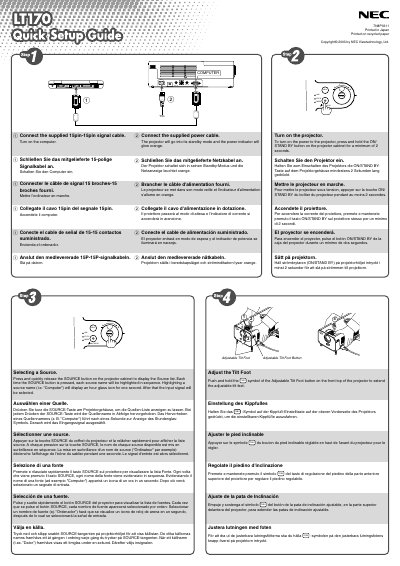
NEC LT170 Quick Start Guide
This guide explains how to connect the NEC LT170 projector to power and a 15‑pin signal cable, turn it on, and select the desired video source. It also describes the adjustable tilt foot for positioning the projector.
Additional sections cover automatic vertical keystone correction (up to ±30°), zoom and focus adjustments, and how to use the MENU and ENTER buttons to automatically optimize the RGB image.
NEC LT170 specifications
| Maximum projection size | 200 inches diagonal |
|---|---|
| Supported resolution | UXGA (1600 × 1200) |
| Input voltage | 100‑120 V / 200‑240 V 50‑60 Hz AC |
| Sound pressure level | < 70 dB(A) |
Source: NEC LT170 Projector User Manual
All NEC LT170 documents by type
Day-to-day operation, settings and troubleshooting. Start here if the product is already set up.
The shortest path to a working setup, usually only a few pages.
Questions answered in these manuals
How can I correct keystone distortion on the projector?
Place the projector on a flat surface; the vertical keystone can be corrected up to 30° upward or downward.
How do I safely disconnect the projector from power?
Unplug the power plug from the wall outlet before handling the projector.
What ventilation clearance is required around the projector?
Leave at least 4 inches (10 cm) of space between the projector and the wall to ensure adequate ventilation.
What is the input voltage range for the LT170?
The projector operates on 100‑120 V or 200‑240 V AC at 50/60 Hz.
How can I reduce RF interference from the projector?
Reorient or relocate the receiving antenna, increase separation between the equipment and receiver, use a different circuit, or consult a qualified radio/TV technician.
What ventilation clearance is required around the projector?
Leave at least 4 inches (10 cm) of space between the projector and any wall or obstruction.