
Key facts
Start here
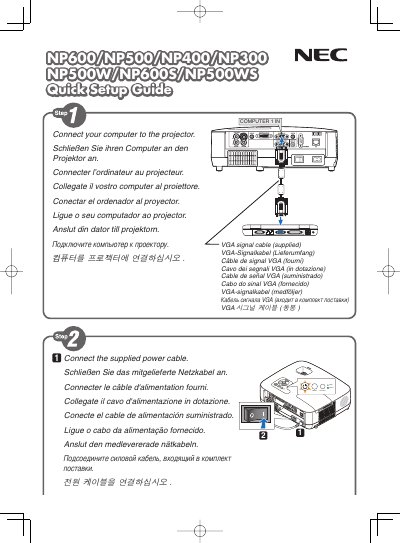
NEC NP600/NP500/NP400/NP300/NP500W/NP600S/NP500WS Quick Setup Guide
The guide provides quick installation steps for NEC NP600 series displays, covering connection of video sources and basic menu navigation.
It explains key functions such as the AUTO ADJ button for automatic image optimization, Digital Zoom, Auto Keystone Off, Wall Color, Lamp Mode, and other display settings.
NEC NP400 specifications
| Power input | 100‑240V AC 50/60 Hz |
|---|---|
| Lamp type | High‑pressure mercury lamp |
| Laser class | Class 2 |
All NEC NP400 documents by type
Day-to-day operation, settings and troubleshooting. Start here if the product is already set up.
- NEC NP4001/NP4000 User Manual 150 p
- NEC NP4001/NP4000 Projector User Manual 150 p
- NEC NP4001/NP4000 User Manual 150 p
- NEC NP4001/NP4000 Projector User Manual 150 p
- NEC NP4001/NP4000 Projector User Manual 150 p
- NEC NP600G/NP500G/NP400G/NP300G/NP500WG/NP600SG/NP500WSG User Guide 109 p
- NEC NP600G/NP500G/NP400G/NP300G/NP500WG/NP600SG/NP500WSG Projector User Manual 109 p
- NEC NP600+/NP500+/NP500C/NP400+/NP400C/NP500W+ Portable Projector User Manual 98 p
The shortest path to a working setup, usually only a few pages.
Questions answered in these manuals
How do I know when to replace the lamp?
When the lamp has reached the end of its usable life, it should be replaced.
How should I disconnect the projector before cleaning it?
Turn off the projector and unplug the power cable before cleaning the housing.
What must I do when the lamp reaches the end of its useful life?
Replace the lamp as soon as the screen shows the end‑of‑life warning; continuing to use it may cause the lamp to break.
When can the projector be disconnected from power after it is turned off?
The projector may be unplugged after it has completed its cooling period following shutdown.
When should I disconnect the power cable during transport?
Always turn off the projector and unplug the power cable before moving it, especially if the lamp or cabinet has been damaged.