
Key facts
Start here
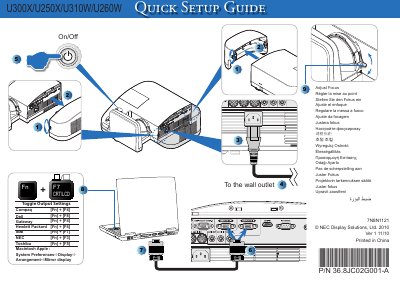
NEC U300X/U250X/U310W/U260W Projector Quick User Manual
This quick user manual provides essential setup steps for NEC U300X, U250X, U310W, and U260W projectors. It includes multilingual instructions for adjusting focus, arranging displays, and basic configuration.
The document notes the part number P/N 36.8JC02G001-A, version 1 11710, and indicates it was printed in China. It is intended for end‑users needing fast reference to get the projector operational. This manual is written in Japanese.
All NEC U260W documents by type
Day-to-day operation, settings and troubleshooting. Start here if the product is already set up.
- NEC U300X/U250X/U310W/U260W Projector User Manual 82 p
- NEC U300X/U250X/U310W/U260W Projector User Manual 82 p
- NEC U300X/U250X/U310W/U260W Projector User Manual 82 p
- NEC U300X/U250X/U310W/U260W Projector user manual(3)
- NEC U300X/U250X/U310W/U260W Projector User Manual 82 p
- NEC U300X/U250X/U310W/U260W User Manual 82 p
- NEC U300X/U250X/U310W/U260W Projector User Manual 82 p
The shortest path to a working setup, usually only a few pages.
Questions answered in these manuals
How do I adjust the focus on the NEC projector?
Use the focus adjustment controls as shown in the manual (e.g., "AdjustFocus").
From: NEC U300X/U250X/U310W/U260W Projector Quick User Manual
What is the part number for this projector?
The part number is P/N 36.8JC02G001-A.
From: NEC U300X/U250X/U310W/U260W Projector Quick User Manual
What should be done when the lamp reaches the end of its usable life?
Replace the lamp.
Where can I find TCO information for the projector?
On the NEC Display Solutions website at the TCO page.
How do I know when the lamp needs to be replaced?
When the lamp has reached the end of its usable life, it must be replaced.
How can I change the fan mode on the projector?
Select the desired fan mode from the projector’s menu using the Fan Mode setting.