
Key facts
- Brand
- NEC
- Model
- LT156
- Industry
- Electronics
- Documents
- 8
- Languages
- EN · FR
- Last added
- 2012-08-02
Start here
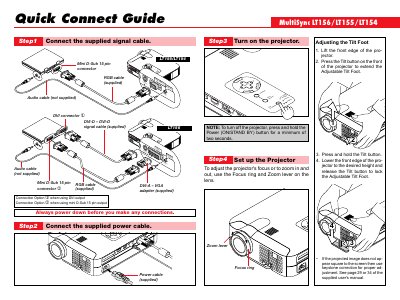
NEC LT156 Projector Quick Connect Guide
The Quick Connect Guide walks you through the basic setup of the NEC LT156 projector, including connecting the supplied signal, power, and optional audio cables, adjusting the tilt foot, focus, and zoom, and powering the unit.
It also describes the remote‑control functions and menu options such as Auto Adjust, keystone correction, lamp hour meter, communication speed settings, and source selection, helping you configure image and system settings quickly.
NEC LT156 specifications
| Resolution (NTSC) | 640 x 480 |
|---|---|
| Resolution (PAL) | 768 x 576 |
| Resolution (VESA 800x600) | 800 x 600 |
Source: NEC LT156 Projector User Manual
All NEC LT156 documents by type
Day-to-day operation, settings and troubleshooting. Start here if the product is already set up.
- NEC MultiSync LT156/LT155/LT154 LCD Projector User's Manual 59 p
- NEC MultiSync LT156/LT155/LT154 LCD Projector User Manual 59 p
- NEC MultiSync LT156/LT155/LT154 LCD Projector User Manual 59 p
- NEC LT156 Projector User Manual 57 p
- NEC LT156 Projector User Manual 57 p
- NEC LT156 User Manual 57 p
- NEC LT156 User Manual 57 p
The shortest path to a working setup, usually only a few pages.
Questions answered in these manuals
What are the NEC MultiSync LT156/LT155/LT154 projectors used for?
These LCD projectors are designed to display digital and analog video signals from a PC.
From: NEC MultiSync LT156/LT155/LT154 LCD Projector User's Manual
What is the maximum output power of the Class 2 laser product inside these projectors?
The internal laser has a maximum output of 1mW.
From: NEC MultiSync LT156/LT155/LT154 LCD Projector User's Manual
What is the maximum output power of the laser in this projector?
The maximum output of the laser is 1mW.
From: NEC MultiSync LT156/LT155/LT154 LCD Projector User Manual
What is the wavelength of the laser radiation?
The wavelength of the laser radiation is 650nm.
From: NEC MultiSync LT156/LT155/LT154 LCD Projector User Manual
What is the maximum laser output power of the NEC MultiSync LT156/LT155/LT154 projector?
The maximum laser output is 1mW.
From: NEC MultiSync LT156/LT155/LT154 LCD Projector User Manual
What is the sound pressure level of the projector according to ISO standards?
The sound pressure level is less than 70 dB(A).
From: NEC MultiSync LT156/LT155/LT154 LCD Projector User Manual