
Key facts
Start here
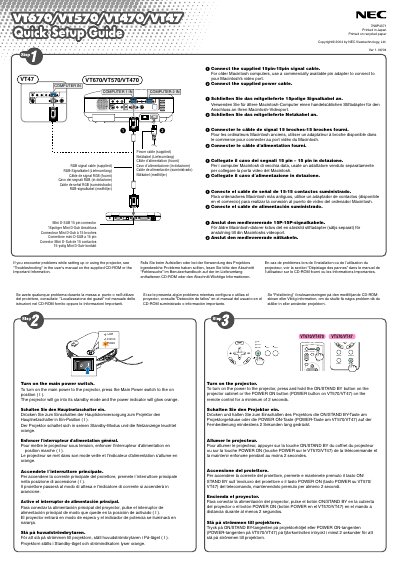
NEC VT670/VT570/VT470/VT47 Quick Start Guide
This guide explains how to unpack the projector and connect the supplied cables, including the power cable and RGB signal cable. It shows how to turn the unit on by using the main power switch or holding the ON/STAND BY button for at least two seconds, and how to select a video source with the COMPUTER 1/2 or SOURCE button.
It also describes image adjustments such as using the focus ring for sharp focus, the zoom lever for image size, the adjustable tilt foot for height, and the Auto Keystone correction feature to fix vertical distortion without any special operation. Additional tips on troubleshooting are provided on the supplied CD‑ROM.
All NEC VT570 documents by type
Day-to-day operation, settings and troubleshooting. Start here if the product is already set up.
- NEC VT670/VT570/VT470/VT47 Projector User Manual 83 p
- NEC VT670/VT570/VT470/VT47 Projector User Manual 83 p
- NEC VT670/VT570/VT470/VT47 Projector User Manual 83 p
- NEC VT670/VT570/VT470/VT47 Projector User Manual 83 p
- NEC VT670/VT570/VT470/VT47 Projector User Manual 83 p
- NEC VT670/VT570/VT470/VT47 Projector User Manual 83 p
The shortest path to a working setup, usually only a few pages.
Questions answered in these manuals
How can I correct vertical keystone distortion?
Use the Auto Keystone correction feature; no special operation is required, just place the projector on a flat surface.
How do I adjust the focus?
Turn the focus ring until the projected image is sharp.
How should I replace the lamp?
Turn the projector off, wait at least 30 seconds, switch off the main power, unplug the power cord, let it cool for 60 minutes, then replace the lamp.
How should the lamp be replaced safely?
After the lamp‑life warning appears, wait at least 30 seconds after power‑off, turn off the main switch, unplug the power cord, let the projector cool for 60 minutes, then replace the lamp following the instructions on page 53.
What safety precautions prevent electric shock?
Do not open the housing, only authorized NEC repairers may service the unit, always unplug the power cord before any maintenance, keep the power inlet accessible, and avoid touching internal high‑voltage components.
How should I safely disconnect the projector from power?
Remove the mains plug; the plug must be accessible and installed as close as possible to the device.