
Key facts
- Brand
- NEC
- Model
- LT35
- Industry
- Electronics
- Documents
- 5
- Languages
- EN · ES
- Last added
- 2012-05-10
Start here
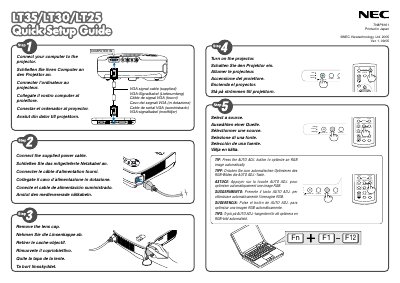
NEC LT35 Quick Start Guide
This guide provides the essential steps to install and configure the NEC LT35 projector, including connecting video sources, adjusting auto‑keystone, and powering the unit. It is intended for users who need to get the projector up and running quickly.
The document covers VGA connection, power‑cable removal, and the use of automatic focus and keystone correction features, with brief instructions for each operation.
NEC LT35 specifications
| Power supply | 100‑240 V AC, 50/60 Hz |
|---|---|
| Lamp type | High‑pressure mercury lamp |
| Maximum tilt angle | 10 degrees |
| Minimum ventilation clearance | 4 inches (10 cm) |
All NEC LT35 documents by type
Day-to-day operation, settings and troubleshooting. Start here if the product is already set up.
The shortest path to a working setup, usually only a few pages.
Questions answered in these manuals
How do I connect a VGA source?
Connect the VGA cable to the VGA input.
What power supply voltage does the projector require?
The projector requires a 100‑240 V AC power source at 50/60 Hz.
How far should the projector be placed from walls for proper ventilation?
Leave at least 4 inches (10 cm) of clearance between the projector and surrounding walls.
What is the minimum clearance needed for ventilation?
Keep at least 4 inches (10 cm) of space between the projector and surrounding walls.
What voltage range does the projector support?
The projector operates on a 100‑240 V AC power source, 50/60 Hz.