
Key facts
- Brand
- NEC
- Model
- LT150Z
- Industry
- Electronics
- Documents
- 5
- Languages
- EN · SV
- Last added
- 2012-08-02
Start here
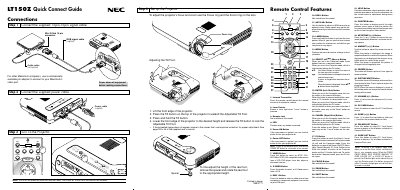
NEC LT150Z Projector Quick Connect Guide
The guide provides step‑by‑step instructions for connecting the supplied 15‑pin spin signal cable, power cable, and RGB signal cable, as well as how to adjust the projector's focus, zoom, and tilt foot. It also explains how to power the unit and turn it off safely.
Additional sections cover the remote control layout, menu tree navigation, troubleshooting tips, and common problems such as power‑up errors, lamp life warnings, and image adjustments like keystone correction.
NEC LT150Z specifications
| Power cable | supplied |
|---|---|
| Audio cable | not supplied |
| RGB signal cable | supplied |
| Mini D‑Sub 15‑pin connector | included |
| Infrared transmitter (remote) | present |
| Laser pointer button | present |
All NEC LT150Z documents by type
Day-to-day operation, settings and troubleshooting. Start here if the product is already set up.
The shortest path to a working setup, usually only a few pages.
Questions answered in these manuals
How long should I wait before replacing the lamp?
Allow a minimum of 90 seconds to elapse after turning off the projector, then disconnect the power cable and allow 60 minutes to cool the projector.
Can I install the projector myself on the ceiling?
No, the projector must be installed by qualified technicians to ensure proper operation and reduce the risk of bodily injury.
How should I safely disconnect the projector from power?
Unplug the power cord from the outlet before performing any service or moving the projector.
How do I turn off the NEC LT150Z projector?
Press and hold the Power OFF button for at least two seconds.
Can the LT150Z be mounted on a ceiling?
Yes, but ceiling installation must be performed by qualified technicians and the ceiling must be strong enough to support the projector.
How should I handle the remote‑control batteries?
Remove the batteries when not in use, do not mix new with old or different types, and never expose them to fire or excessive heat.
From: NEC Projecteur micro portable LT150Z Manuel d'utilisation