
This quick connect guide explains how to connect the MultiSync LT84/LT140 projector to a computer or other video source.
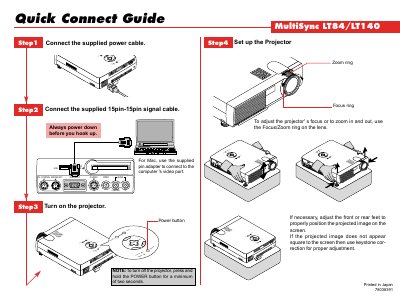
This Quick Connect Guide shows how to attach the power cable, the 15‑pin signal cable, and adjust the projector's focus, zoom, and keystone settings. It also explains how to power the unit on and off safely.
The optional LT40RT remote control mouse kit lets you operate the computer's mouse from the projector. Instructions cover connecting the serial cable, using the remote's buttons, and re‑activating the computer's built‑in mouse control.
| Power button press duration | minimum two seconds |
|---|---|
| Signal cable type | 15‑pin to 15‑pin |
Press and hold the POWER button for at least two seconds.
Turn off both the projector and computer, connect the serial cable as shown, then power on the projector followed by the computer.